Delusion Google Slide Template: A Comprehensive Overview
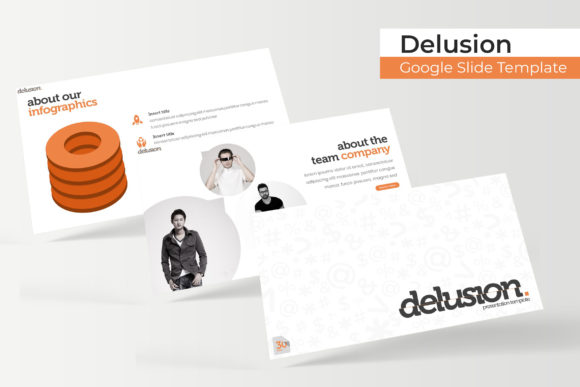
The Delusion Google Slide Template is a versatile and visually engaging presentation tool designed for users seeking a modern, professional look without the need for advanced design skills. With 150 total slides across five premade color variations, this template offers a wide range of options to suit different styles and purposes. Each color variation includes 30 slides, making it easy to find the right aesthetic for your project. Whether you're creating a business proposal, academic presentation, or creative portfolio, the Delusion template provides a structured yet flexible foundation.
What Makes Delusion Unique?
One of the standout features of the Delusion Google Slide Template is its handcrafted infographic design. These infographics are created specifically for PowerPoint and Google Slides, ensuring that data and information are presented in an appealing and easy-to-understand format. The use of pixel-perfect illustrations adds a level of polish that can elevate the overall quality of your presentation.
The template also includes section break slides, which help organize content into distinct parts of your presentation. This feature is particularly useful for longer presentations where clear transitions between topics are essential. Additionally, the gallery and portfolio slides allow users to showcase visual content effectively, making it ideal for designers, artists, or anyone with a visual portfolio to present.
Customization and Flexibility
A key advantage of the Delusion template is its resizable and editable graphic picture placeholders. These placeholders allow users to easily insert their own images, charts, or diagrams without disrupting the layout of the slide. The drag-and-drop functionality further simplifies the process, making it accessible even for those with limited design experience.
Since the template is based on master slides, any changes made to the master slide will automatically apply to all related slides. This ensures consistency throughout the presentation and saves time during the editing process. Users can also choose from five pre-made color schemes, each offering a unique visual identity that can be adapted to match brand guidelines or personal preferences.
What’s Included in the Package?
The Delusion Google Slide Template comes with five PPTX files, each tailored for widescreen formats. This ensures compatibility with most modern projectors and display systems. Alongside the slides, the package includes a README file that provides instructions on how to use and customize the template effectively.
The first font used in the template is a free download, and the package includes a direct link to access it. This is beneficial for users who want to maintain a consistent typographic style without the need for additional purchases. However, it's important to note that the photographs or pictures used in the preview are for illustration purposes only and are not included in the template itself.
Comparing Delusion with Other Presentation Templates
When compared to other presentation templates, the Delusion Google Slide Template stands out due to its balance of aesthetics and functionality. Many similar templates focus heavily on one aspect—either design or usability—but Delusion manages to offer both. Its structured approach makes it easier to navigate, while the variety of color options allows for greater personalization.
For users who prioritize simplicity and ease of use, the Delusion template is a strong contender. It avoids unnecessary complexity, allowing users to focus on content rather than formatting. In contrast, some alternative templates may require more technical knowledge to customize effectively, which could be a barrier for less experienced users.
Best Fit and Use Cases
The Delusion template is particularly well-suited for professionals in fields such as marketing, education, and design. Its clean layout and professional appearance make it ideal for business presentations, while the gallery and portfolio slides cater to creative industries. For students or educators, the structured sections and clear formatting can help in organizing complex information effectively.
However, the template may not be the best choice for highly specialized or niche presentations. If your project requires unique design elements or custom animations, you may need to look for a more specialized template. That said, the flexibility of the Delusion template allows for many modifications, so it can still serve as a solid starting point.
Strengths and Limitations
One of the main strengths of the Delusion template is its comprehensive set of slides, which covers a wide range of presentation needs. The inclusion of section break slides and gallery layouts ensures that users have the tools necessary to create a well-organized and visually appealing presentation. Additionally, the availability of multiple color variations allows for greater adaptability across different projects.
On the other hand, the template does have some limitations. Since it is based on a fixed structure, there may be constraints on how much customization is possible beyond the provided elements. While the drag-and-drop feature is helpful, it may not be sufficient for users who want complete control over every aspect of their design. Furthermore, the lack of stock images or photographs in the template means that users must source their own visuals, which could be a drawback for those looking for a fully ready-to-use solution.
When to Choose Delusion and When to Consider Alternatives
The Delusion Google Slide Template is a great option if you're looking for a reliable, user-friendly template that balances style with functionality. It's especially beneficial for individuals or teams who need to create professional presentations quickly without investing significant time in design work. Its structured approach can also be advantageous for those who are new to slide creation and want to ensure consistency in their output.
However, if your presentation requires a highly customized design or unique visual elements, you may need to explore other options. Some alternatives offer more extensive customization features or a wider selection of built-in graphics and images. In such cases, it's worth evaluating whether the tradeoff between ease of use and design flexibility aligns with your specific needs.
Conclusion
The Delusion Google Slide Template offers a practical and visually appealing solution for users seeking a professional presentation tool. With its range of color options, customizable elements, and structured layout, it provides a solid foundation for a variety of projects. While it may not be the best fit for every scenario, its strengths in usability and adaptability make it a valuable resource for many users. By understanding its capabilities and limitations, you can determine whether it meets your specific requirements or if another option might be more suitable.