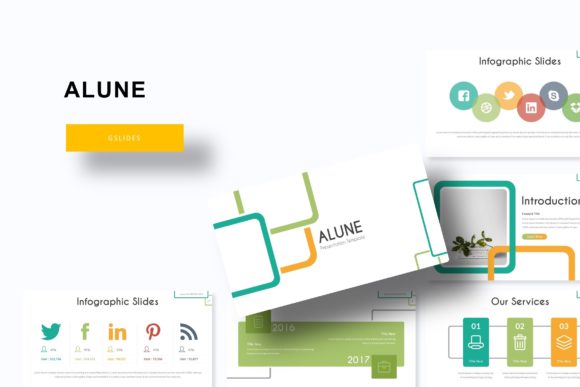
Alune Google Slide Template: A Versatile Presentation Solution for Modern Professionals
Presentations remain one of the most powerful tools for communicating ideas, whether in a boardroom, a classroom, or a virtual meeting. Yet creating a visually cohesive and engaging slide deck from scratch takes time, design skill, and careful planning. This is where the Alune Google Slide Template steps in, offering a structured yet flexible foundation that helps professionals, entrepreneurs, and creatives build polished presentations quickly. With 150 total slides spread across five premade color variations, Alune provides a complete ecosystem for storytelling, data visualization, and brand expression without requiring advanced design expertise.
Why Presentation Templates Matter More Than Ever
The way we consume information has shifted dramatically in recent years. Audiences expect clean visuals, logical flow, and minimal clutter. A well-designed presentation template does not just save time; it ensures consistency, enhances readability, and helps the presenter focus on content rather than formatting. Alune addresses these needs by offering a cohesive set of slides that feel intentional and professional from the first slide to the last.
Modern workflows often involve collaboration across teams, remote stakeholders, and tight deadlines. Having a template that works seamlessly within Google Slides means users can edit, share, and present from anywhere, on any device. Alune is built with this flexibility in mind, making it a practical choice for anyone who needs to produce high-quality presentations under real-world constraints.
150 Total Slides Across Five Distinct Color Variations
One of the standout aspects of the Alune template is its scale. Rather than offering a single color scheme, it includes five complete sets of 30 slides each, each with its own premade color palette. This gives users the freedom to choose a look that aligns with their brand, mood, or audience without starting from scratch. Whether you need a calm, neutral tone for a corporate update or a vibrant palette for a creative pitch, there is a variation ready to use.
Each color variation maintains the same underlying structure and layout options, so switching between them does not disrupt the flow of content. This modular approach is particularly valuable for agencies or freelancers who manage multiple client presentations and need to maintain distinct visual identities for each project.
Handcrafted Infographics and Section Break Slides
Data visualization is a critical component of many presentations, but building infographics from scratch can be time-consuming. Alune includes handcrafted infographic slides that allow you to present statistics, timelines, comparisons, and processes in a visually engaging way. These are not generic charts; they are thoughtfully designed graphics that enhance understanding and retention.
Section break slides serve as visual pauses that help organize longer decks into clear chapters. In practice, this means your audience can follow your narrative more easily, and you can transition between topics without losing momentum. For educators, marketers, and business leaders who present complex information, these structural elements make a noticeable difference in audience engagement.
Gallery and portfolio slides are also included, making Alune equally suited for showcasing work. Photographers, designers, architects, and other visual professionals can use these layouts to present their projects in a clean, professional format that lets the work speak for itself.
Resizable and Editable Graphics with Picture Placeholders
A common frustration with many templates is the lack of flexibility. Images may be locked in place, graphics may not scale properly, and text boxes may require tedious manual adjustment. Alune addresses these issues with resizable and editable graphics that adapt to your content. Every element is designed to be modified without breaking the overall layout.
Picture placeholders use a simple drag-and-drop system, so you can insert your own images without worrying about alignment or cropping. This feature is especially useful for teams that need to update presentations regularly with new photos, product shots, or team headshots. It also reduces the risk of formatting errors when multiple people are editing the same file.
Built on Master Slides for Maximum Efficiency
Master slides are the backbone of any well-structured presentation template. Alune is built on master slides, which means changes made to the master layout automatically apply across all slides that use that layout. This saves significant time when you need to update fonts, colors, or positioning across a large deck.
For users who are not familiar with master slides, the advantage is simple: you can make global updates in seconds rather than editing each slide individually. This is particularly valuable for business owners and marketers who produce recurring presentations, such as monthly reports, pitch decks, or training materials.
Pixel-Perfect Illustrations for a Polished Look
The quality of visual elements in a presentation directly affects how the audience perceives the content. Alune includes pixel-perfect illustrations that remain sharp and clear on any screen, whether you are presenting on a laptop, a projector, or a large monitor. These illustrations are designed to complement the text without overwhelming it, striking a balance between visual interest and readability.
In an era where remote presentations are common, having visuals that look crisp on both small and large displays is a practical advantage. It ensures that your message is not undermined by blurry or low-resolution graphics, regardless of how your audience views the presentation.
What Is Included in the Alune Google Slide Template Package
The complete package includes five PPTX files, each corresponding to one of the five color variations. Additionally, five PPTX widescreen files are provided, giving you the flexibility to choose between standard and widescreen formats depending on your presentation environment. This dual-format approach is thoughtful, as many modern screens and projectors use widescreen ratios, while some legacy systems still rely on the standard format.
A Readme file is included with instructions on how to use the template, along with information about the fonts used. The fonts are free to download, and a link is provided, so you can replicate the exact look of the template without any licensing concerns. This attention to detail makes the template accessible even for users who are not deeply familiar with typography or design tools.
It is worth noting that the photographs or images shown in the preview are for illustration purposes only and are not included in the download. This is a standard practice in the template industry, and it means you will need to supply your own images. However, the picture placeholders make this process straightforward, so you can replace the sample images with your own in just a few clicks.
Practical Implications for Different Users
For business owners, Alune reduces the time spent on presentation design, freeing up energy for strategy and execution. Instead of worrying about fonts and colors, you can focus on the message. For marketers, the template offers a consistent brand experience across multiple presentations, which reinforces brand recognition and professionalism.
Educators and trainers can benefit from the section break slides and infographic layouts, which help structure lessons and make complex topics easier to understand. Freelancers and consultants, who often need to produce varied presentations for different clients, will appreciate the five color variations as a way to quickly tailor each deck without starting from scratch.
Even hobbyists and curious readers who create presentations for personal projects, community events, or non-profit work will find value in having a polished template that elevates their content. The learning curve is minimal, and the results are noticeably more professional than a default slide deck.
How Alune Fits Into Modern Presentation Trends
The trend in presentation design has moved away from dense, text-heavy slides toward clean, visual storytelling. Audiences respond better to slides that are easy to scan and that highlight key points without overwhelming the viewer. Alune aligns with this shift by offering layouts that prioritize clarity and visual hierarchy.
There is also a growing expectation for presentations to be accessible across devices and platforms. Google Slides is inherently cloud-based, which means your presentation can be edited on a tablet, a phone, or any computer with an internet connection. Alune is designed to work within this ecosystem, making it a practical choice for teams that value mobility and collaboration.
The inclusion of multiple color variations also reflects a broader move toward personalization. One-size-fits-all templates are no longer sufficient; users want the ability to customize without starting from zero. Alune provides that middle ground, offering structure and consistency alongside creative flexibility.
Final Observations on the Alune Google Slide Template
Choosing a presentation template is a practical decision that affects how your ideas are received. Alune offers a well-rounded solution that balances design quality, ease of use, and flexibility. With 150 slides, five color variations, handcrafted infographics, and master slide functionality, it covers the essential needs of most presenters without adding unnecessary complexity.
Whether you are preparing a quarterly business review, a marketing proposal, a classroom lesson, or a personal portfolio, having a reliable template allows you to focus on what matters most: the content. Alune provides that foundation with thoughtful design and practical features that work in real-world scenarios.
The template is not about flashy gimmicks or overblown effects. It is about creating a clean, professional, and adaptable framework that helps you communicate effectively. For anyone who regularly creates presentations, having a tool like Alune in your workflow is a small investment that pays dividends in time saved and quality gained.