Barax Google Slide Template: A Designer's Toolkit for Polished Presentations
Every designer knows the feeling—staring at a blank slide, knowing the concept is solid but the execution needs to feel cohesive, intentional, and visually stunning. The Barax Google Slide Template eliminates that friction by delivering a complete system of 150 slides spread across five premade color variations, so you can focus on storytelling rather than rebuilding design elements from scratch. Whether you're pitching a brand identity, laying out a marketing deck, or crafting a portfolio showcase, Barax gives you the structure and flexibility to produce professional presentations that resonate.
What Makes Barax Stand Out in Modern Presentation Design
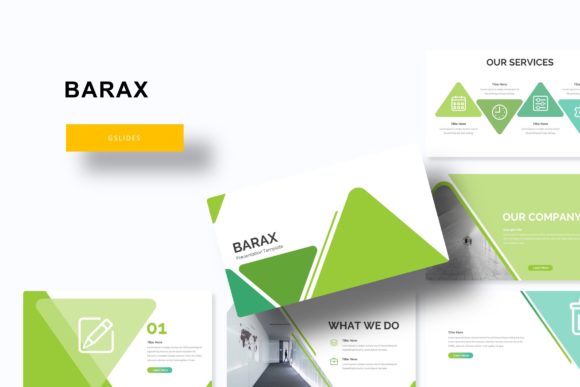
Great presentation design is about more than just aesthetics—it's about visual hierarchy, consistency, and clarity. Barax offers 30 slides per template across five distinct color variations, giving you the freedom to choose a palette that aligns with your brand identity or project mood. Each slide is built on master slides, which means global changes are fast and predictable. You can update fonts, colors, or imagery across the entire deck with a few clicks, saving hours of manual work while preserving pixel-perfect precision.
The handcrafted infographics, section break slides, and gallery/portfolio layouts are particularly valuable for designers who need to present data or visual work in a compelling way. Instead of forcing complex information into generic layouts, Barax provides dedicated spaces for charts, timelines, feature comparisons, and image grids—all resizable and editable.
Key Features for Creative Workflows
- 150 total slides organized into five color-coded templates (30 slides each)
- Drag-and-drop picture placeholders for fast image swapping
- Pixel-perfect illustrations that maintain clarity at any scale
- Resizable and editable graphics for custom typography and iconography
- Section break slides to improve flow and narrative structure
- Gallery and portfolio slides ideal for showcasing creative assets
Each purchase includes five PPTX files (widescreen format), a Readme file, and a free font download link. Note that photographs used in previews are for illustration only and are not included in the files.
Practical Applications Across Design Disciplines
The versatility of Barax extends well beyond standard business presentations. For branding and logo design projects, the clean layout and consistent color palettes help you present logo variations, mood boards, and brand guidelines in a unified format. Marketing professionals can use the infographic slides to translate campaign data into digestible visuals, while social media managers can repurpose slide content for Instagram carousels or LinkedIn decks.
In editorial design and web design contexts, the typography-first approach and balanced composition ensure that text and imagery coexist without clutter. UI/UX designers will appreciate how the master-slide system mirrors component-based thinking—making it easy to iterate on layouts without breaking the overall design system. Even packaging design and print design teams can use the template to draft product presentations or client pitches that feel polished from the first draft.
Why Visual Consistency Matters
A presentation is only as strong as its weakest slide. When color palettes shift unexpectedly, or typography varies across pages, the audience loses trust in the content. Barax addresses this by embedding five complete color variations directly into the template, so you never have to hunt for hex codes or rebuild styles halfway through a project. The visual hierarchy is baked in: headings command attention, body text remains readable, and graphic elements support rather than overwhelm the message.
This kind of thoughtful design workflow is essential for maintaining brand identity across multiple touchpoints—whether you're producing digital marketing materials, advertising campaigns, or merchandise mockups. When every slide feels like it belongs to the same family, your audience can focus on your ideas instead of being distracted by inconsistencies.
Tips for Getting the Most Out of Barax
To maximize the template's potential, start by defining your primary color palette from the five premade options. Then, replace placeholder images with your own high-resolution visuals—product shots, team photos, or portfolio pieces. Use the section break slides to divide your narrative into clear chapters, and take advantage of the gallery layouts for case studies or before-and-after comparisons.
If you're working on a team, the PPTX format makes collaboration seamless. Designers can fine-tune layouts, marketers can adjust copy, and stakeholders can review the deck without worrying about broken formatting. The free font download link ensures everyone uses the same typefaces, preserving the original design intent from start to finish.
Finally, remember that less is often more. The template's clean lines and generous white space are deliberate—they give your content room to breathe. Resist the urge to overcrowd slides with text or effects. Trust the visual hierarchy that Barax provides, and your audience will reward you with better engagement.
In the end, the quality of your creative assets directly shapes how your work is perceived. Whether you're pitching to a client, presenting to stakeholders, or curating a personal portfolio, the Barax Google Slide Template equips you with a professional foundation that elevates both aesthetics and communication. Thoughtful design isn't just about looking good—it's about making your message impossible to ignore.