Oqu Google Slide Template: Modular Design for Modern Presentations
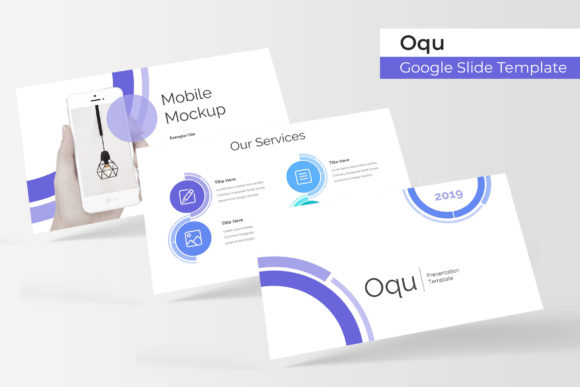
Presentations remain one of the most potent forms of professional communication. Whether you're pitching to a client, reporting quarterly results to stakeholders, or teaching a workshop, the visual quality of your slides directly affects how your message is received. Yet creating polished, consistent decks takes time — time that many professionals simply do not have. This is where thoughtful template design steps in. The Oqu Google Slide Template has emerged as a resource that addresses this exact tension between quality and efficiency. With 150 total slides across five premade color variations, it represents a growing trend in presentation design: modular, ready-to-adapt systems that respect both brand identity and creative flexibility.
The shifting landscape of visual communication
Over the past decade, the bar for presentation quality has risen considerably. Audiences have become visually literate, expecting clean layouts, coherent color schemes, and purposeful imagery. A deck that looks thrown together — mismatched fonts, inconsistent spacing, low-resolution graphics — signals carelessness, regardless of the quality of the content. At the same time, the pace of business has accelerated. Freelancers juggle multiple clients, marketers produce decks weekly, and entrepreneurs pitch investors on tight deadlines. The need for a system that delivers professional results without starting from scratch each time has never been greater.
The Oqu Google Slide Template fits directly into this context. It is not just a set of slides; it is a structured framework designed to reduce repetitive design decisions while preserving visual harmony. By offering 30 slides per template, with five distinct color variations, it gives users a complete toolkit that can be adapted to different brands, moods, or presentation types. This modular approach reflects a broader industry shift toward component-based design — the idea that complex visuals can be built from reusable, interchangeable parts.
Why structured templates matter in a content-saturated market
Every day, thousands of presentations are created around the world. Most of them will be forgotten shortly after they are delivered. The ones that stick have something in common: clarity, consistency, and a visual rhythm that guides the viewer's eye. Achieving this requires more than just good taste; it demands a repeatable system. The Oqu Google Slide Template provides exactly that. It includes handcrafted infographics, section break slides, and gallery and portfolio layouts — all elements that help structure information in a logical, visually appealing way.
What makes this template particularly relevant is its emphasis on master slides and resizable graphics. Master slides ensure that changes made at the template level propagate across all slides, saving hours of manual adjustments. Resizable graphics mean that images and illustrations can be scaled without losing quality, which is essential when working with different screen sizes or print formats. These features address a common pain point for busy professionals: the need to maintain visual consistency across a deck without micromanaging every element.
In a market where attention is scarce, a well-structured presentation can be the difference between securing a deal and being overlooked. Templates like Oqu help professionals put their best foot forward, even when time is limited.
Color versatility and brand alignment
Color is one of the most powerful tools in visual communication. It sets the tone, reinforces brand identity, and influences how information is perceived. However, choosing and applying a consistent color palette across a 30-slide deck can be surprisingly difficult, especially when working with clients or collaborating with a team. The Oqu Google Slide Template addresses this by offering five premade color variations, giving users a range of options that can be selected based on the context — whether that means a conservative palette for a corporate board meeting or a vibrant one for a creative pitch.
This color flexibility also supports brand alignment. Professionals who need to adhere to specific brand guidelines can use one of the premade colorways as a starting point and then tailor further. Because the template is built on master slides, updating colors globally is straightforward. This reduces the risk of inconsistencies and ensures that the final deck reflects the intended brand image.
From a broader perspective, the growing demand for customizable yet cohesive design tools reflects a change in how businesses approach branding. Brands today are expected to be consistent across touchpoints while still feeling human and adaptable. Templates that offer structured flexibility — like Oqu — are better suited to this reality than rigid, one-size-fits-all designs.
Practical applications across professional roles
The versatility of the Oqu Google Slide Template makes it relevant for a wide range of professionals. Consider a freelance designer who works with multiple clients across different industries. Having a single template system with five color variations means they can quickly spin up a deck for a tech startup, a nonprofit, or a luxury brand — each with its own visual identity — without starting from zero. The inclusion of picture placeholders with drag-drop functionality streamlines the process of integrating client imagery, which is often a time-consuming step.
For marketers, the template's gallery and portfolio slides are especially valuable. Showcasing case studies, product shots, or campaign results requires a layout that lets visuals breathe while keeping supporting text clear. Oqu's gallery sections are designed with this balance in mind, providing grids and spaced layouts that guide the eye naturally. Section break slides also help segment presentations into digestible chapters — a technique that improves retention and keeps the audience oriented.
Entrepreneurs and startup founders will find the handcrafted infographics useful for explaining concepts, metrics, or processes. Infographics are powerful because they simplify complex information, but creating them from scratch requires both design skill and time. Having pre-built, editable infographics within the template allows founders to communicate their value proposition without needing a design background.
Even educators and trainers can benefit. The structured layout and consistent visual language reduce cognitive load for learners, allowing them to focus on content rather than being distracted by inconsistent design. The ability to customize colors to match institutional branding is an added bonus.
Drag-drop simplicity and the evolution of workflow
One of the standout features of the Oqu Google Slide Template is its drag-drop picture placeholder system. On the surface, this is a convenience feature — but it reflects a deeper shift in how professionals expect to work with design tools. The demand for low-friction workflows has grown across every industry. People want to spend less time formatting and more time thinking, writing, and presenting. Drag-drop functionality, combined with pixel-perfect illustrations and resizable graphics, means that users can achieve professional results with minimal technical effort.
This aligns with the broader trend toward no-code and low-code tools in business. Just as tools like Canva and Figma have democratized graphic design, templates built on master slides and intuitive placeholders are democratizing presentation design. You do not need to be a trained graphic designer to create a deck that looks like it was professionally produced. The Oqu template is part of this movement: it provides a high-quality foundation that anyone can build upon.
Furthermore, the fact that the template includes 5 PPTX files (in widescreen format) ensures compatibility with PowerPoint, while the emphasis on Google Slides means it works seamlessly in cloud-based workflows. For teams that collaborate remotely, this is a significant advantage. Multiple people can edit the same deck, leave comments, and update slides in real time — all while maintaining the template's design integrity.
What's included and what it means for creative independence
A common frustration with many templates is that they look great in preview but fall apart when you try to customize them. The Oqu Google Slide Template addresses this by building every element on master slides and using pixel-perfect illustrations. This means that when you resize a graphic or change a color, the result remains crisp and aligned. The package includes five PPTX files (one for each color variation), a readme file, and a download link for the recommended free fonts. The note that photographs used in the preview are for illustration only is standard practice, but it also highlights an important point: the template is designed to work with your images, not just stock photos.
For professionals who value creative independence, this is crucial. You are not locked into a specific set of images or a rigid layout. The template provides the structure — the grid, the typography hierarchy, the infographic templates — but leaves you in control of the content. This balance between guidance and freedom is exactly what many creators and entrepreneurs are looking for. They want to save time without sacrificing authenticity.
The inclusion of section break slides and gallery and portfolio slides further expands the template's utility. Section breaks are often overlooked in presentation design, but they serve a vital function: they give the audience a moment to reset and refocus before moving to a new topic. Gallery slides, on the other hand, allow for visual storytelling — whether you are showcasing team members, product features, or client logos. These are not just decorative elements; they are functional tools that improve the flow and impact of a presentation.
Broader implications for presentation design
The rise of premium templates like Oqu signals a broader maturation of the presentation design market. It is no longer enough to simply have slides that are "not ugly." The expectation is that slides should actively enhance the message — through thoughtful layout, purposeful color choices, and clear visual hierarchy. Templates are evolving from static layouts into dynamic systems that can be adapted to different contexts without losing coherence.
This evolution is driven by changing expectations in the workplace. Remote and hybrid work has made asynchronous communication more common, and presentations are often shared as standalone documents rather than delivered live. A deck that relies on a presenter's charisma to paper over design flaws will fall flat when read alone. Templates that prioritize clarity, self-explanatory layouts, and visual consistency are better suited to this new reality.
Additionally, the emphasis on premade color variations reflects a growing understanding that color is not just aesthetic — it is strategic. Different industries, audiences, and even seasons call for different palettes. Having five variations at hand allows professionals to match the visual tone to the context, whether that means cool blues for a financial report or warm oranges for a creative workshop.
Conclusion
The Oqu Google Slide Template is more than a collection of slides. It is a response to the real-world pressures that professionals face: tight deadlines, high expectations, and the need to communicate complex ideas clearly. With 150 total slides spread across five color variations, handcrafted infographics, section break slides, gallery and portfolio layouts, and drag-drop picture placeholders, it offers a comprehensive system for creating presentations that look intentional and professional.
For freelancers, marketers, entrepreneurs, and educators alike, the template provides a foundation that respects both speed and quality. It reduces the friction of design work without reducing the quality of the output. In a world where visual communication is more important than ever, having a reliable, adaptable template is not a luxury — it is a practical necessity.
The broader lesson here is that the best tools are the ones that get out of your way. The Oqu template does exactly that: it gives you a flexible, pixel-perfect framework so you can focus on what matters most — your message, your audience, and the impact you want to create.