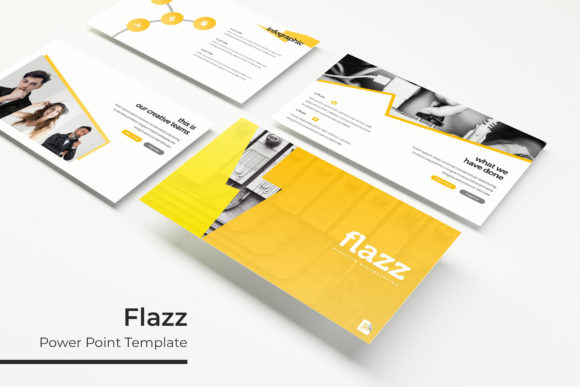
Flazz Power Point Template for Impactful Presentations
Creating a presentation that holds attention from start to finish requires more than good content—it demands visual clarity, consistent design, and a structure that guides the viewer naturally. The Flazz Power Point Template delivers all of that and more, offering 150 total slides across five distinct color variations. Whether you are pitching a business concept, building a portfolio, or teaching an online course, having a flexible and well-organized template saves hours of formatting work while elevating the final result.
What Makes Flazz Power Point Template Stand Out
With 150 slides organized into five premade color sets, Flazz provides thirty slides per template variation. This structure means you can choose a color direction that fits your brand or project mood—neutral, vibrant, minimal, or bold—and instantly have a cohesive deck ready for custom content. Each template includes handcrafted infographics, section break slides, dedicated gallery and portfolio pages, and resizable graphics based on master slides. The pixel-perfect illustrations and drag-and-drop picture placeholders make updating visuals straightforward, even if you have limited design experience.
For professionals who regularly build presentations, this eliminates the repetitive work of aligning elements or matching colors. The five separate PPTX files (all in widescreen format) let you start fresh without overwriting previous work, and the included font download link ensures typography stays consistent across devices.
Creative Possibilities Across Different Projects
A template like Flazz is not limited to one type of presentation. Its modular nature supports a wide range of applications, and understanding how to adapt its components can help you get the most out of every slide.
Business Pitches and Client Proposals
When you need to present a strategy, product launch, or quarterly review, the section break slides help separate topics clearly. Use the handcrafted infographics to turn data into digestible visuals—replace placeholder charts with your own numbers, and keep the prebuilt icons for quick storytelling. The gallery slides work well for showcasing team photos, client logos, or product images. Because each color variation has its own mood, you can match the palette to your company’s brand guidelines or the tone of the proposal.
Portfolio and Creative Showcases
Designers, photographers, and content creators can use the portfolio slides to present work samples without cluttering the layout. The picture placeholders are sized to keep focus on the visuals, and the master slides ensure that every page maintains consistent margins and typography. You can mix full-bleed images with text-heavy pages, or use the gallery spreads for a clean grid of project thumbnails. The pixel-perfect illustrations add a polished touch without distracting from your actual work.
Educational Content and Workshops
Course creators and educators often need slides that balance information density with visual breathing room. The section break slides work well for introducing new modules, while the infographics help explain processes or comparisons. Since the graphics are resizable and editable, you can simplify complex diagrams or add annotations directly in PowerPoint. The five color variations let you differentiate courses or modules by palette—warm tones for one series, cool tones for another—giving learners a subtle visual cue about content shifts.
Adapting Flazz for Different Audiences and Formats
The same template can feel completely different depending on how you customize it. Understanding your audience and the platform where the presentation will be viewed helps you make smart adjustments.
For In-Person Presentations
Live audiences benefit from high contrast and clear section breaks. Choose a color variation with light backgrounds and dark text for readability in bright rooms. Use the full-width image slides as opening statements, and rely on the infographic pages to summarize key points. Keep bullet points minimal—the handcrafted icons can often replace text lists entirely. This approach keeps the audience focused on you rather than reading crowded slides.
For Digital Sharing and Self-Paced Viewing
When a presentation is viewed on a screen without a speaker, the slides need to be more self-explanatory. Add brief captions to portfolio images, include labels on infographics, and use consistent call-to-action elements across pages. The master slides help here because any global edit—like updating a footer or changing a color accent—applies instantly to all thirty slides. For webinars or recorded content, a darker color variation with high contrast text can reduce eye strain during long sessions.
For Print and PDF Distribution
If your presentation will be printed or shared as a PDF, pay attention to margins and font sizes. The resizable graphics allow you to scale elements without losing sharpness, and the pixel-perfect illustrations remain crisp at different output sizes. Consider using the gallery slides for a grid of portfolio pieces, and section break pages as dividers in a printed booklet. The five color variations give you the option to print in grayscale without losing structure—just test your chosen palette on a sample page first.
Practical Tips for Keeping Results Clear and Consistent
Working with a large template like Flazz is efficient, but a few habits help maintain quality across all slides.
- Replace all placeholder images with your own early in the process. The drag-and-drop picture placeholders are designed for speed, but filling them with real content first lets you assess the overall visual balance.
- Use one color variation per presentation. Switching between palettes within the same deck can confuse viewers. Instead, use the five files for different projects or clients.
- Customize the master slides for recurring elements. Add your logo, contact details, or navigation hints to the master layout. Any change made there updates every slide automatically, saving time and reducing errors.
- Limit the number of infographics per section. While the handcrafted graphics are visually appealing, overusing them can crowd the message. One strong infographic per topic is more effective than three busy slides.
- Test your fonts on different devices. The free font download link provided with Flazz ensures you have the correct typeface installed. Send a test slide to a colleague or open the file on another computer to confirm everything renders as intended.
Who Benefits Most from Flazz Power Point Template
This template suits a broad range of users. Freelancers and small business owners appreciate having multiple color options without paying for separate templates. Marketers and content creators can quickly produce client-ready decks that feel custom-made. Educators and trainers benefit from the clean section breaks and infographic layouts, which support structured learning. Hobbyists and bloggers who present at community events or share resources online will find the portfolio and gallery slides especially useful for showcasing work without spending hours on formatting.
The template also works well for teams that need to maintain brand consistency across multiple presentations. Because each file is based on master slides, a team lead can set up the template once and share it, knowing that colors, fonts, and spacing will stay uniform even when different members add content.
Getting the Most from the Included Files
The Flazz package includes five PPTX files, each with a premade color variation, and all in widescreen format. Before starting your project, open each file to see which palette fits your content. The readme file explains the font download and installation process—doing this first prevents formatting issues later. Remember that the photographs used in the preview are not included, so plan your own image assets ahead of time. Stock photo libraries, your own portfolio, or simple screenshots can fill the placeholders effectively.
If you are new to working with master slides, take a few minutes to explore the template’s structure. Right-click on the slide master view to see how elements are layered. This understanding makes it easier to customize backgrounds, move footers, or adjust color accents without breaking the design. The resizable and editable graphics give you control over every visual element, so you can adapt the template to your exact needs without starting from scratch.
Flazz Power Point Template is a practical tool for anyone who regularly builds presentations and wants a professional, flexible foundation. Its 150 slides across five color variations, handcrafted infographics, and thoughtful layout options make it suitable for business, creative, and educational contexts alike. With a little planning and your own content, it transforms from a template into a presentation that feels distinctly yours.