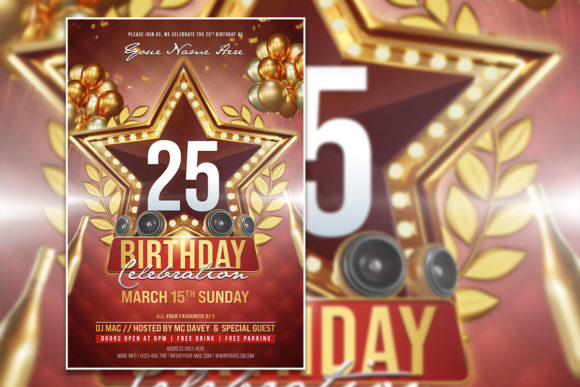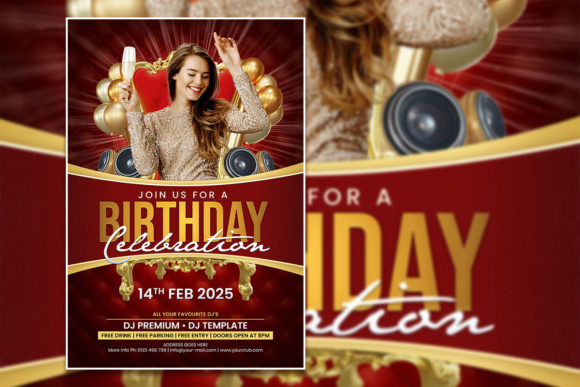
Red Style Birthday Invitation Template
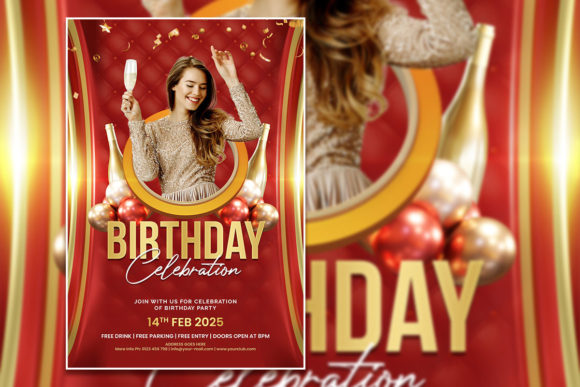
A birthday invitation sets the tone before anyone walks through the door. The Red Style Birthday Invitation Template offers a bold, warm, and celebratory starting point that can be adapted for nearly any age group or party theme. With its high-resolution 300 dpi PSD file, fully editable layers, and included font links, this template is designed for both speed and flexibility. Whether you are a busy parent organizing a child's party, a small business owner inviting clients to a networking mixer, or a creative freelancer designing for a client, this template saves hours of setup time while leaving full control in your hands.
What makes this template particularly useful is the balance between a strong visual identity and complete editability. At 2000 x 3000 pixels, the canvas offers plenty of room for detailed text, event information, and a personal photo replacement. The red color palette naturally conveys excitement, urgency, and celebration, making it ideal for milestone birthdays like 18th, 21st, 30th, or 50th celebrations. But the same template can also be softened for a more elegant feel by adjusting hue, saturation, or overlaying a complementary color gradient.
Creative possibilities with a red themed flyer
Red is a powerful color in design because it immediately draws attention. When you use a Red Style Birthday Invitation Template, you are leveraging a color that signals festivity and importance. Here are several creative directions you can explore:
- Classic elegance: Pair the red background with gold or metallic text. Use serif fonts for a sophisticated look suitable for a 40th or 50th birthday party. The template's organized layers make it easy to swap in a more formal font while keeping the layout intact.
- Modern minimalism: Reduce visual clutter by removing some decorative elements and using plenty of white space around the central message. Replace the default photo with a high-contrast portrait shot in black and white to let the red background pop.
- Playful and bold: Use the template for a child's birthday by overlaying bright confetti elements or a custom illustrated character. Since all text layers are editable, you can replace placeholder party details with the child's name, age, and party theme.
- Event promotion beyond birthdays: The red palette works surprisingly well for anniversary parties, retirement gatherings, or even product launch events. Change the headline from "Birthday Celebration" to "Grand Opening" or "Anniversary Night" and you have a completely new flyer.
The key is that the template does not lock you into one interpretation. With a few layer adjustments, you can move from a children's party to a corporate event without starting from scratch.
Adapting the template for different audiences and platforms
Different audiences respond to different visual cues. A teenager's birthday party demands vibrant, energetic design, while a professional networking event requires a cleaner, more restrained approach. The Fully Editable Birthday flyer template structure supports both because you can adjust typography, imagery, and messaging independently.
For social media promotion, the 2000 x 3000 pixel size can be cropped or resized to fit Instagram posts (1080 x 1080), Facebook event covers, or Pinterest pins. The high resolution ensures that even after scaling down, the flyer remains crisp. If you are a marketer promoting a birthday sale or a small business owner running a limited-time offer, the red color naturally creates urgency. Add a countdown element or "Limited Seats" text to the flyer to drive action.
For print distribution, the 300 dpi resolution and CMYK-friendly RGB color mode (easily converted in Photoshop) make the template ready for professional printing at a local shop or online service. The included JPG file is useful for quick previews or digital sharing, while the PSD file remains the master for any future edits.
Practical customization workflow
Getting the most out of this template requires a simple but deliberate workflow. Here is a step-by-step approach that keeps results organized and professional:
- Open the PSD in Adobe Photoshop. The template comes with organized layers, so you can quickly find the text, image, and background groups.
- Replace the placeholder photo. Select the image layer, right-click, and choose "Replace Contents" or simply place your photo above the existing one and create a clipping mask. This ensures your image fits perfectly within the frame.
- Edit the text layers. Use the Text tool to click on any placeholder text and type your own event details. The font links are provided in the help file, so download and install them first to maintain the intended look. If you prefer a different font, simply select the text and choose from your installed fonts.
- Adjust colors if needed. While the red style is the foundation, you can create variations by adding adjustment layers such as Hue/Saturation or Color Balance. This allows you to produce a matching set of flyers for a multi-event series.
- Export for different uses. Save a PSD copy for future edits, export a high-quality JPG for social media, and consider a PDF for professional printing.
Because the template is fully editable, you are not limited to the original layout. You can move elements, resize graphics, or delete sections you do not need. The structure is meant to be a starting point, not a cage.
Ideas for entrepreneurs, educators, and hobbyists
Different users will find different value in this template. Here are a few audience-specific applications:
Small business owners: Use the flyer to invite customers to a birthday month sale or a store anniversary event. Replace the party-themed wording with promotional copy and add your logo. The red background works well for limited-time offers because it grabs attention in email newsletters or window displays.
Event planners and freelancers: Offer the template as part of a package for clients who need quick but polished invitations. Because the file is fully editable, you can produce multiple versions for a single event, such as a formal evening invitation and a more casual digital save-the-date.
Educators and hobbyists: Teach a basic Photoshop class using this template as a hands-on project. Students learn layer organization, text editing, image replacement, and color adjustment in a single practical exercise. The included help file provides font download links and editing instructions, which reduces setup time for the instructor.
Bloggers and content creators: Use the flyer to promote a birthday-themed blog post, a giveaway, or a live event. The bold visual style stands out in feed-based platforms like Instagram and Pinterest, where bright colors and clear text perform well.
Keeping your results clear and audience-friendly
A common mistake when editing a template is overcrowding it with information. The Red Style Birthday Invitation Template is designed with a clear focal point, so resist the urge to add too many details. Stick to the essentials: event name, date, time, location, RSVP information, and one strong image. If you need to include additional details such as a dress code or a gift registry, use a separate smaller text block or a QR code that links to a landing page.
Consistency matters across all event communications. If you use this template for the invitation, consider matching it with a simple thank-you card or a social media banner that uses the same red color and typography. This creates a cohesive brand experience for your guests, whether the event is personal or professional.
When replacing the photo, choose an image that is high resolution and well-lit. A blurry or poorly composed photo will drag down the overall quality of the flyer, no matter how polished the template is. If you do not have a suitable photo, consider using a stock image that matches the event mood, such as a festive cake, balloons, or a celebratory toast.
Final thoughts on working with editable templates
The value of a well-made template lies in the time it saves and the professional baseline it provides. The Fully Editable Birthday flyer template in PSD format gives you a jumpstart on design without requiring advanced Photoshop skills. But the real magic happens when you treat the template as a canvas rather than a fixed layout. Experiment with color overlays, try different font pairings, or layer in your own graphics. Because the file is organized and non-destructive, you can always revert to the original if an experiment does not work out.
For anyone who wants to produce a birthday invitation that feels personal and polished, this red style template is a reliable starting point. It works for digital and print, for children and adults, for personal celebrations and business events. The combination of bold color, editable layers, and high resolution makes it a practical tool that can be adapted again and again.