The Summit Keynote Template: A Strategic Tool for Professional Presentations
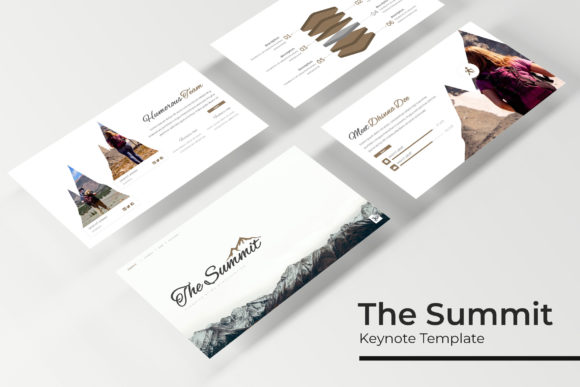
The Summit Keynote Template is a comprehensive PowerPoint presentation solution designed for professionals who need to deliver impactful, visually compelling presentations. With 150 total slides across five premade color variations, it offers a flexible and scalable foundation for a wide range of speaking engagements, from business conferences to educational seminars. This template is not just a collection of slides—it’s a strategic framework that supports clear communication, effective storytelling, and professional branding.
Why The Summit Keynote Template Matters for Strategic Communication
In today’s fast-paced digital landscape, the ability to convey complex ideas clearly and persuasively is more important than ever. The Summit Keynote Template helps users structure their content in a way that aligns with audience expectations and maximizes engagement. Whether you're presenting to investors, clients, or colleagues, the template ensures your message is both visually appealing and logically structured.
Strategically, this template allows presenters to focus on content rather than design. By providing a consistent visual language, it reduces the time spent on formatting and increases the time available for refining messaging. This is particularly valuable for professionals who need to prepare multiple presentations or who are new to slide design but want to maintain a high standard of quality.
Key Features That Support Practical Use Cases
The Summit Keynote Template includes several features that make it ideal for real-world applications:
- 5 Premade Color Variations: Each color scheme is carefully curated to reflect different brand identities and event themes. This allows users to quickly adapt the template to match their specific needs without compromising visual consistency.
- 30 Slides per Template: The modular design ensures that each section of the presentation can be customized independently. Whether you're outlining a project plan, presenting research findings, or pitching a new idea, the template provides a logical flow that supports clarity and coherence.
- Handcrafted Infographic Slides: These slides help simplify complex data, making it easier for audiences to grasp key insights. They are especially useful for presentations involving statistics, trends, or process diagrams.
- Gallery and Portfolio Slides: Ideal for showcasing work, products, or case studies, these slides provide a clean and professional way to highlight achievements or offerings.
- Resizable and Editable Graphic Placeholders: Users can easily insert images, charts, or icons without disrupting the overall layout. This flexibility makes the template suitable for both technical and creative presentations.
How to Approach The Summit Keynote Template for Maximum Impact
Using The Summit Keynote Template effectively requires a thoughtful approach. Start by identifying the core message of your presentation. What do you want your audience to take away? Once you have a clear objective, you can select the most appropriate slides and customize them to support your narrative.
Consider the following steps when preparing your presentation:
- Define Your Audience: Understanding who will be viewing your presentation helps tailor the tone, depth, and style of your content.
- Outline Your Structure: Use the template’s slide structure to organize your content logically. Begin with an introduction, move through key points, and conclude with a strong call to action.
- Customize Visuals: Replace placeholder graphics with relevant images, charts, or icons that reinforce your message. Ensure that all visuals align with your brand identity.
- Refine Your Message: Focus on clarity and conciseness. Avoid overcrowding slides with text—use bullet points and short phrases to maintain readability.
By following this approach, you can transform the template into a powerful tool that enhances your communication and strengthens your professional presence.
When to Use The Summit Keynote Template
The Summit Keynote Template is best suited for situations where a polished, professional presentation is required. This includes:
- Business Conferences and Seminars: For entrepreneurs, marketers, and industry leaders looking to share insights or promote new ideas.
- Educational Workshops and Training Sessions: For educators and trainers who need to deliver structured content with visual aids.
- Client Presentations and Pitch Meetings: For small business owners, freelancers, and creatives seeking to showcase their services or proposals.
- Internal Team Briefings: For managers and team leaders who need to communicate goals, strategies, or updates efficiently.
Its versatility makes it a valuable asset for anyone who regularly presents information in a professional setting.
Potential Risks of Using The Summit Keynote Template Without Clear Goals
While The Summit Keynote Template is a powerful resource, it is not a substitute for thoughtful planning. Using it without a clear purpose can lead to generic, unfocused presentations that fail to engage the audience. One of the biggest risks is relying too heavily on the template’s structure without adapting it to the specific needs of your content.
For example, if you simply fill in placeholder text without considering how each slide contributes to your overall message, your presentation may lack direction. Similarly, using the wrong color scheme or visual elements can confuse the audience or undermine your brand.
To avoid these pitfalls, always start with a well-defined objective. Ask yourself: What is the main takeaway I want my audience to have? How does each slide support that goal? By answering these questions, you can ensure that your use of the template is intentional and effective.
Long-Term Value and Strategic Growth
Investing in The Summit Keynote Template can provide long-term value by streamlining your presentation workflow and improving the quality of your output. Over time, this can lead to better results in areas such as client acquisition, team collaboration, and personal branding.
For instance, a marketing professional who consistently uses the template to create high-quality pitches may see increased success in securing new clients. A teacher who uses it to structure lessons may find that students engage more deeply with the material. In both cases, the template becomes a strategic asset that supports ongoing growth and development.
Additionally, the template’s flexibility allows it to evolve with your needs. As your career or business grows, you can revisit and refine your presentations to reflect new insights, strategies, or objectives.
Conclusion: Using The Summit Keynote Template Intentionally
The Summit Keynote Template is more than just a set of slides—it’s a strategic tool that empowers professionals to communicate more effectively. By understanding its features, applying it thoughtfully, and aligning it with clear goals, users can unlock its full potential. Whether you’re delivering a keynote speech, presenting to stakeholders, or teaching a class, this template can help you achieve better outcomes through clearer, more impactful communication.