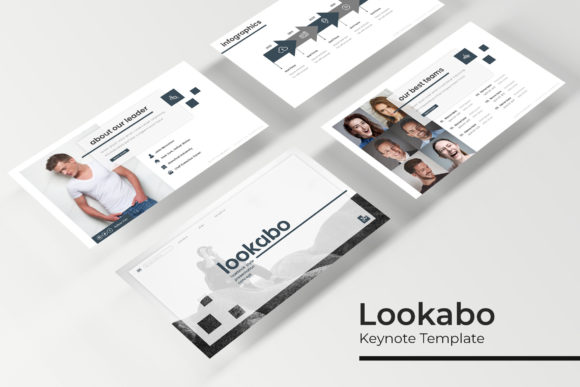
Lookabo Keynote Template: A Practical Tool for Presentations That Actually Work
If you’ve ever stared at a blank slide wondering how to make your content look polished without a design degree, you’re not alone. The Lookabo Keynote Template was built for exactly that moment. Whether you’re preparing a client pitch, building a course module, or organizing a community event, this template offers 150 slides spread across five handcrafted color variations. Each variation gives you 30 slides, so you’re not stuck with a one-size-fits-all look. From infographics to section breaks to portfolio layouts, the structure is designed to save time while keeping your message front and center.
What sets this set apart is its practical focus. The slides come as PPTX files (compatible with Keynote and PowerPoint), and everything is based on master slides. That means when you change one element on the master, it updates across all slides instantly. For anyone who has ever had to manually tweak 50 slides after a last-minute brand color change, that alone is a game-changer. The picture placeholders are drag-and-drop, and the graphics are fully resizable and editable. You don’t need special software skills to make it your own.
Pitching with Confidence: Entrepreneurs and Startups
When you’re pitching to investors or potential clients, every slide needs to earn its keep. The Lookabo Keynote Template gives you professional layouts that don’t shout “template.” The handcrafted infographics let you present data in a way that feels natural—not like a cluttered chart. Imagine you’re putting together a funding deck. You have traction numbers, a roadmap, and maybe a competitive analysis. With the infographic slides, you can visualize market share or user growth without starting from scratch. The section break slides help you transition from “the problem” to “the solution” smoothly, keeping your audience engaged.
Because the template includes five color variations, you can match your brand palette without fighting the design. Just pick the variation closest to your colors, then tweak the accent tones using the master slide. The resizable graphics mean you can scale icons or illustrations to fit your content, not the other way around. And if you need to swap in your own product screenshots or team photos, the placeholders accept images with a simple drag-and-drop. No adjusting alignment or cropping endlessly.
For entrepreneurs who are constantly refining their pitch, having 30 slides per variation means you’ve got enough room to iterate. You can have a version for live demos, another for email attachments, and a third for investor portals—all using the same visual language.
Teaching Without Tech Headaches: Educators and Trainers
Whether you’re running a workshop, recording online lessons, or presenting at a conference, keeping learners focused is easier when your slides help tell the story. The Lookabo Keynote Template is particularly useful for educators who need to break complex topics into digestible chunks. The section break slides act as clear pauses between modules. Instead of a boring divider with just a number, you get a designed screen that signals a new chapter. That small visual cue helps students follow along.
The handcrafted infographics are a hidden gem for training materials. You can explain a flowchart, a timeline, or a process without relying on generic clip art. For example, if you’re teaching a marketing course and need to show the customer journey, the infographic slides let you map each stage with icons and arrows that are already styled. You can edit the text and colors directly, so the material feels custom. The picture placeholders also make it easy to include case study images, screenshots, or diagrams without messing up the layout.
Freelance trainers and corporate educators often work under tight deadlines. Having a template that’s ready to drop content into means you can spend more time on the actual teaching and less on formatting. Since the template is based on master slides, any changes you make to fonts or background colors apply across all slides automatically. That’s especially helpful when you’re creating a multi-session course and want consistency across weeks.
Brand Consistency for Marketers and Brand Managers
Marketers know the struggle of keeping a consistent visual identity across presentations, especially when different team members are creating slides. The Lookabo Keynote Template solves this by offering five premade color variations that can be locked into your brand guidelines. You don’t have to start from a blank template each time. Instead, choose the variation that aligns with your color palette and use the master slides to enforce fonts, logo placement, and accent colors.
The resizable and editable graphics mean you can repurpose the same template for campaign presentations, internal reports, webinars, and social media strategy decks. For instance, when rolling out a new product, you can use the portfolio and gallery slides to showcase product images, user stories, or press mentions. The picture placeholders ensure that images stay within the designed frames, so the final result looks intentional.
One frequent pain point is that presentation templates often include low-resolution illustrations that pixelate when projected. The Lookabo Keynote Template uses pixel-perfect illustrations, which hold up on large screens and retina displays. For marketers presenting to stakeholders or at conferences, that professional finish matters.
If you work with external agencies or freelancers, sharing the template file (one of the five PPTX files) gives everyone a starting point that respects your brand. You avoid the endless back-and-forth of “can you make the logo bigger?” because the layout already accounts for logo placement.
Portfolio Presentations for Freelancers and Creatives
Freelancers—designers, photographers, writers, consultants—need to showcase their work in a way that feels custom but doesn’t take days to create. The Lookabo Keynote Template includes dedicated gallery and portfolio slides that make it easy to present multiple projects without overcrowding. You can drop in your best images, add a short description, and let the slide design do the rest.
Suppose you’re a photographer preparing a pitch for a commercial client. The gallery slides allow you to feature 6–8 images on a single slide with consistent spacing and borders. If you need to add more examples, there are multiple slide variations within the 30-slide set. The picture placeholders are already set up for drag-and-drop, so you’re not fiddling with cropping or alignment. The pixel-perfect illustrations on supporting slides (like “about me” or “services”) round out the presentation without feeling like filler.
For consultants who present case studies, the portfolio slides can be used to show before-and-after results or client testimonials. The infographic slides work well for visualizing metrics—like growth percentages or time savings—without needing a separate charting tool. Because the entire template is editable, you can also add your own icons or swap in your brand font using the master slide.
The five color variations give you flexibility depending on the industry. A designer might use a muted palette for a sophisticated look, while a social media manager could choose a brighter variation for a more energetic pitch. One template file can serve multiple client presentations.
Small Business Planning Made Simple
Small business owners often wear many hats, and designing professional presentations is rarely the top priority. But whether you’re presenting to a local community group, applying for a small business grant, or onboarding new employees, the Lookabo Keynote Template makes it look like you have a dedicated design team.
The section break slides help structure any presentation. Use them to separate your business overview from your financial projections or your marketing plan. The handcrafted infographics let you present sales data, market research, or operational workflows in a visually clear way. You don’t need to be a data viz expert—just type in your numbers and adjust the labels.
One practical advantage is that the template comes with five PPTX files, each with a different color variation. If your business rebrands later, you don’t need to buy a new template. Just open the variation that matches the new colors and update the content. The master slide approach means global changes happen in seconds.
Nonprofit organizations and community groups also benefit. The portfolio slides work well for showcasing project impact, and the gallery slides can feature event photos or beneficiary stories. Since the template is editable, you can translate elements or adjust tone without losing the professional structure.
Key Considerations Before You Start Using the Lookabo Keynote Template
Before you download and start customizing, there are a few practical things to keep in mind. The template files are in PPTX format, which works natively with Keynote and PowerPoint. However, the template is optimized for Keynote, so you’ll get the best experience if you use it there. If you primarily use PowerPoint, it will still work, but some advanced master slide features may behave slightly differently.
The free font download link is included in the Readme file. Make sure to install the fonts before you start editing, otherwise your slides may default to a system font and the layout might shift. It’s a small step that saves frustration later.
All photographs used in the preview are for illustration only. They are not included in the download. But the picture placeholders are designed to make your own images look natural. Simply drag and drop your photos into the designated frames—the template will automatically crop and position them.
If you’re working with a team, consider establishing a shared folder with the chosen color variation and a short style guide. Because the graphics are resizable and editable, team members might accidentally alter a layout. Setting up the master slides first and locking the background can help maintain consistency.
Lastly, think about how many slides you actually need per presentation. With 30 slides per color variation and 150 total, you don’t have to use them all. Pick the ones that fit your story and delete the rest. The template is modular by design, so you can mix and match between variations if you’re comfortable with minor tweaks.
From pitching to teaching to showcasing your work, the Lookabo Keynote Template offers a solid foundation that respects your time and your message. The combination of handcrafted infographics, pixel-perfect illustrations, and master slide efficiency makes it a practical choice for anyone who values clarity over flash. Whether you’re a solo entrepreneur, a busy educator, or a marketer aiming for consistency, this template helps you present with confidence—without starting from zero every time.