Lide Keynote Template for Flexible Presentations
When you need to put together a presentation quickly, the last thing you want is to wrestle with clunky slides or hunt for design elements that just do not fit your message. The Lide Keynote Template aims to remove that friction. It is a complete presentation system built for Apple Keynote, but its design and structure also carry over neatly to PowerPoint through the included PPTX files. Whether you are a freelancer preparing a client pitch, a teacher organizing a module, or a small business owner laying out quarterly numbers, this template gives you a solid starting point without demanding you become a design expert overnight.
The core idea behind this template is flexibility. Instead of offering one rigid set of slides, Lide provides 150 total slides spread across 5 premade color variations. Each color set contains 30 slides, which means you can pick a palette that matches your brand or mood and then work within a consistent, professional framework. The colors are not thrown together randomly; they are coordinated so that headings, body text, accents, and backgrounds all work in harmony. If you have ever spent twenty minutes trying to match a shade of blue across different slide masters, you will appreciate having this handled from the start.
What Makes This Template Different from a Standard Deck
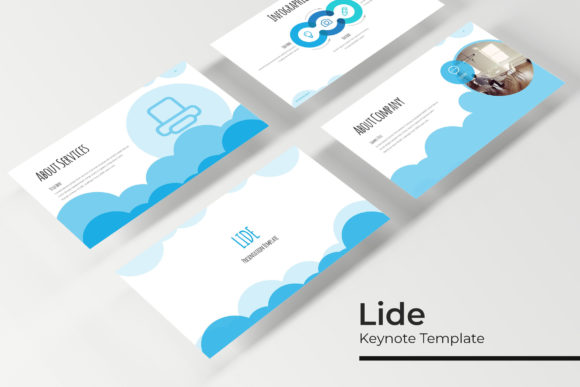
A typical presentation template might give you ten or twelve slides and call it a day. Lide goes further by including handcrafted infographics, section break slides, gallery and portfolio layouts, and resizable graphics with picture placeholders. These are not generic shapes dropped onto a slide; the graphics are pixel-perfect illustrations that scale cleanly whether you present on a laptop screen or a large monitor. The drag-and-drop picture placeholders let you swap in your own images without breaking the alignment or proportions of the slide. For anyone who has ever resized an image by hand only to have it look stretched or off-center, that small feature saves real time.
The template also relies on master slides. This means you can edit the overall look of the deck by changing one master slide, and those changes flow through to every slide that uses that layout. If you decide halfway through to adjust the font size on all your title slides, you do not have to go slide by slide. You update the master, and it is done. That approach keeps your presentation consistent and cuts down on repetitive manual work.
Practical Benefits for Busy Professionals
If you create presentations regularly, you know that the difference between a good deck and a mediocre one often comes down to polish. Lide helps you reach that polish faster. The 5 color variations mean you are not stuck with one corporate look. You can choose a light, clean palette for a client meeting or a darker, more dramatic set for a conference keynote. Each variation comes as a separate PPTX file, so you do not have to hunt through folders to find the right style. Just open the file that matches the color scheme you want, and start building.
The template also includes a Readme First document that explains the fonts used and provides a link to download them for free. This is a small detail, but it matters. Many presentation templates rely on paid fonts that you either do not have or have to purchase separately. Here, the fonts are freely available, so your slides will look exactly as intended when you share the file with a colleague or present on a different computer.
Where You Can Use Lide in Real Life
A template like this is most useful when it matches the kind of work you actually do. Here are a few scenarios where Lide fits naturally.
Client Pitches and Business Proposals
Imagine you are a consultant preparing a proposal for a potential client. You need to show your understanding of their problem, present your methodology, and then walk through case studies or past work. The portfolio slides and gallery layouts in Lide give you a clean way to display screenshots, photos, or project summaries without crowding the page. The section break slides help you transition between parts of the presentation, so your audience knows when you are moving from the problem to the solution. This structure makes your proposal feel more organized and easier to follow.
Educational Modules and Training Sessions
Teachers, trainers, and workshop leaders often need to present information in digestible chunks. The handcrafted infographics in Lide are ideal for explaining processes, showing comparisons, or highlighting key data points. Instead of pasting a chart from a spreadsheet and hoping it fits, you can use the template's built-in graphic elements to build a clear visual that reinforces your point. The 30 slides per color scheme also give you enough room to cover multiple topics without running out of layouts or feeling repetitive.
Personal Branding and Portfolio Reviews
Freelancers and creative professionals can use Lide to build a portfolio deck that they send to potential clients or include on their website. The gallery and portfolio slide options let you feature your best work with image placeholders that keep the focus on the visuals. Because the template is resizable and editable, you can tweak the layout to suit your specific projects. If you are a photographer, you might want larger images with minimal text. If you are a writer, you might emphasize captions and descriptions. The master slide structure makes it easy to adjust these preferences without rebuilding the entire deck.
Internal Team Updates and Reporting
For small business owners or team leads, regular updates are part of the job. Lide's section break slides help you separate different departments or initiatives, and the infographics give you a way to present metrics without staring at a spreadsheet. The premade color variations also allow you to match the deck to your company's brand colors. If your brand uses a specific green and gray, you can choose the variation that comes closest and then fine-tune from there. Since the graphics are built on master slides, adjustments apply across the board, keeping everything cohesive.
Important Things to Consider Before You Start
While Lide is a powerful tool, it helps to know a few things before you dive in. First, the template is designed primarily for Keynote and PowerPoint through the included PPTX files. If you primarily use Google Slides or another presentation tool, you will need to import the file, and some formatting may shift. The pixel-perfect illustrations are crafted for these main platforms, so other software might handle them differently.
Second, the photographs or pictures used in the preview are not included with the template. They are for illustration only. This is standard practice, but it means you will need to supply your own images. The drag-and-drop picture placeholders make this easy, but you should be ready with your own photos or licensed stock images if you want to use visuals right away.
Third, while the template includes 5 PPTX files (one for each color variation) in widescreen format, you may want to check that the proportions fit your intended display. Widescreen (16:9) is standard for most modern projectors and monitors, but if you are presenting on an older screen, you might need to adjust the format slightly. The resizable graphics and master slides help with this, but it is worth testing before a live presentation.
Who Will Get the Most Value from This Template
Beginners and casual users will appreciate that Lide does not require advanced design skills. You can open a file, replace placeholder text with your own, and drop images into the designated slots. The template does the layout work for you. More experienced users will value the 5 color variations and the ability to customize through master slides. If you know your way around Keynote or PowerPoint, you can push the template further by tweaking colors, adjusting fonts, or adding your own graphics into the existing structure.
Entrepreneurs, marketers, and small business owners often need to produce multiple presentations for different audiences. Having 150 slides across 5 color schemes means you can repurpose content without starting from scratch. You might use one color scheme for investor meetings and another for customer webinars, keeping the same core slides but changing the visual tone. That versatility saves time and ensures your presentations stay fresh.
Final Thoughts on Getting Started
The Lide Keynote Template is not a magic solution that will write your presentation for you, but it does remove many of the tedious design decisions that slow you down. The handcrafted infographics, section break slides, and portfolio layouts give you a library of slide types to draw from, while the master slide structure keeps everything consistent. Whether you are preparing a one-time pitch or building a library of decks for ongoing use, this template offers a practical foundation that you can adapt to your own needs.
Before you choose a color variation or start dropping in content, take a few minutes to look through the Readme First guide and download the recommended fonts. That small step will save you from formatting surprises later. Then pick the color scheme that feels right for your audience and start building. With the picture placeholders, resizable graphics, and pixel-perfect illustrations, you will have a polished presentation ready sooner than you might expect.