Barax Keynote Template: A Practical Tool for Streamlined Presentation Workflows
Presentations remain a core part of how professionals communicate ideas, pitch products, and share data. But building a presentation from scratch every time is inefficient. The Barax Keynote Template addresses this problem directly. It provides a structured, visually consistent foundation that lets you focus on content rather than design. This article explores what the Barax Keynote Template offers, how it fits into practical workflows, and how you can integrate it into your own process for better results with less effort.
What Is the Barax Keynote Template?
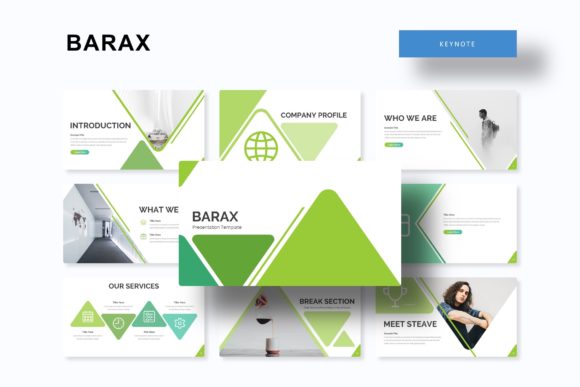
The Barax Keynote Template is a comprehensive presentation package designed for Apple Keynote, but it also includes PowerPoint compatibility through its 5 PPTX files. With 150 total slides organized into 5 color variations of 30 slides each, it gives you a complete toolkit for building polished presentations efficiently. Each color variation functions as a standalone template, so you can choose the palette that fits your brand or project without reworking slides from scratch.
Beyond the slide count, the template includes handcrafted infographics, section break slides, gallery and portfolio layouts, resizable and editable graphics, picture placeholders with drag-and-drop functionality, and pixel-perfect illustrations. Everything is built on master slides, which means changes you make to a master slide automatically update every slide that uses it. This saves significant time when you need to adjust fonts, colors, or positioning across an entire deck.
Where Barax Fits in a Broader Workflow
Professionals rarely create presentations in isolation. A typical workflow might involve research, content gathering, design, review, and delivery. The Barax Keynote Template supports multiple points in this process.
Before the Project: Planning and Preparation
When you are planning a presentation, having a clear structure reduces decision fatigue. With Barax, you can review the 30 slide layouts in your chosen color variation and map your content to specific slide types. For example, you know you need an opening slide, an agenda, a few section breaks, some data slides with infographics, and a closing slide. The template already provides these, so your planning phase becomes a matching exercise rather than a blank-page struggle.
If you are collaborating with a team, you can distribute the relevant PPTX file and assign slides to different contributors. Because the slides are based on master slides, everyone works within the same visual system, which reduces the need for last-minute design fixes.
During the Project: Building and Refining
The middle phase of any presentation project is where most of the time gets spent. Barax accelerates this by eliminating repetitive layout work. Instead of positioning text boxes, aligning images, or adjusting colors, you simply replace placeholder content with your own. The picture placeholders allow drag-and-drop image insertion, which is especially useful when you have a folder of photos or graphics ready to use.
The handcrafted infographics are particularly valuable here. If you need to present survey results, timelines, or process flows, you can use the pre-built infographic slides instead of creating diagrams from zero. This also improves consistency, because all infographics share the same visual language as the rest of the deck.
Section break slides help organize longer presentations into clear chapters. When you are building a deck for a conference talk, a client pitch, or a training session, these slides act as visual cues that keep your audience oriented. You can customize the section titles without worrying about design details.
After the Project: Review, Revisions, and Reuse
Once your draft is complete, the template continues to save time during review cycles. If a client or stakeholder requests changes to the color scheme, you can switch to a different color variation from the 5 premade options without rebuilding slides. Alternatively, you can adjust the master slides to apply global updates instantly.
For long-term use, Barax is ideal for organizations that produce regular presentations. A marketing team that creates weekly reports, a consultancy that pitches to clients monthly, or an educator who builds course decks each semester can reuse the same template with new content. The pixel-perfect illustrations and clean design ensure that your presentations look professional consistently.
Key Features and Practical Applications
Understanding the features is one thing, but knowing how to use them in real situations matters more. Here is how each major feature of the Barax Keynote Template supports actual workflow needs.
5 Premade Colors, 30 Slides Each
Having 5 color variations means you are not locked into one look. You can use different palettes for different contexts: a dark palette for stage presentations, a light palette for printed handouts, or a brand-specific palette for client work. Each color set includes 30 slides, so you have enough variety for long decks without running out of layouts.
Handcrafted Infographics
Infographics are often the most time-consuming part of a presentation to build. Barax includes pre-designed infographic slides that you can customize with your own data. Use them for timelines, process steps, comparisons, or statistics. Because they are vector-based and editable, you can change colors, sizes, and labels without losing quality.
Section Break Slides
Section break slides are more than just dividers. They signal a shift in topic and give the audience a moment to process. In practice, you can use them to outline the structure of your presentation at the start, then reveal each section as you progress. This works well for training sessions, webinars, and multi-chapter reports.
Gallery and Portfolio Slides
If your work involves showcasing images, such as product photos, design work, or event highlights, the gallery and portfolio slides provide clean layouts for displaying multiple images. The picture placeholders are drag-and-drop friendly, so you can arrange visuals quickly. These slides are especially useful for photographers, designers, real estate agents, and marketers.
Resizable and Editable Graphics
All graphics in Barax are resizable and editable. You can scale them without pixelation, change colors to match your palette, or group and ungroup elements for further customization. This matters when you need to adapt a graphic to a specific data point or brand guideline. Because the graphics are vector-based, they remain sharp on any screen size or resolution.
Picture Placeholder with Drag and Drop
The drag-and-drop picture placeholders simplify image insertion. Instead of cropping and resizing each photo manually, you drop it into the placeholder and the template adjusts it automatically. This saves minutes per slide, which adds up significantly in a 30-slide deck.
Master Slides for Global Control
Master slides are the backbone of efficient presentation management. When you edit a master slide in Barax, every slide that uses that master updates automatically. Use this to change font styles, logo placement, background colors, or footer information across your entire deck. This is particularly useful during the final polish phase when small inconsistencies often creep in.
Pixel-Perfect Illustrations
The illustrations in Barax are pixel-perfect, which means they look crisp on retina displays and projectors alike. When you present on a large screen or share a PDF version, the illustrations maintain their quality. This contributes to a professional impression that reflects well on your brand.
What’s Included and How to Get Started
The Barax package includes 5 PPTX files, each corresponding to one of the 5 color variations. All files are in widescreen format, which is the standard for modern displays. You also get a Readme file that provides instructions for installation and customization. The fonts used in the template are listed, and a free font download link is included so you can maintain the intended typography without additional cost.
One important note: photographs or pictures shown in the preview are for illustration only and are not included in the download. You will need to supply your own images, but the picture placeholders make that integration straightforward.
Practical Implementation Tips
Integrating the Barax Keynote Template into your routine requires some upfront setup, but the long-term payoff is significant. Here are tips for making it work smoothly.
- Choose your color variation early. Before you start adding content, open each of the 5 color options and pick the one that best matches your brand or project mood. Switching later is possible, but it is easier to commit upfront.
- Customize the master slides first. Set your fonts, logo, and primary colors in the master slides before building individual slides. This ensures every new slide you create already reflects your identity.
- Use section breaks as anchors. Outline your presentation structure by placing section break slides first, then fill in the content slides between them. This keeps your deck organized and prevents scope creep.
- Leverage the infographics for recurring data types. If you present monthly sales figures or quarterly metrics, customize the infographic slides once and reuse them. Save a copy of your customized slides as a template within your own file library.
- Keep a backup of your base template. After you customize the colors and master slides, save a copy as your own branded template. This way, you can start future projects without redoing the setup.
- Test on your presentation hardware. Before the actual presentation, test your slides on the projector or screen you will use. Widescreen format works on most modern displays, but verify that fonts and graphics render correctly.
Usability and Compatibility Considerations
The Barax Keynote Template works natively in Apple Keynote, but the included PPTX files open in Microsoft PowerPoint as well. If you work in a mixed environment where some team members use Keynote and others use PowerPoint, the PPTX format provides a common ground. However, some advanced Keynote features may not transfer perfectly to PowerPoint, so test your deck if you plan to switch between platforms.
Because the template uses master slides, anyone with basic presentation skills can customize it. You do not need advanced design experience to produce professional results. This makes Barax suitable for solo entrepreneurs who wear multiple hats, as well as larger teams with dedicated designers.
Long-Term Use and Scalability
Templates are most valuable when they become part of a repeatable process. The Barax Keynote Template supports scalability in several ways. First, the 5 color variations allow you to maintain visual variety while staying within a consistent structural framework. You can use different colors for different clients, departments, or event types without reinventing the architecture.
Second, the editable graphics and infographics mean you can build a library of custom visuals over time. As you refine your presentations, you can save modified graphics for reuse in future decks. This gradually reduces the time you spend on each new presentation.
Third, the master slide system makes it easy to update an entire portfolio of presentations at once. If your company rebrands or you change your preferred font, you can apply the update to all existing decks by modifying the master slides in your base template.
Final Observations
The Barax Keynote Template is not just a collection of slides. It is a workflow tool that addresses the friction points in presentation creation planning, consistency, and revision. By providing a structured foundation with flexible customization options, it allows you to focus on the message rather than the medium. Whether you are preparing for a board meeting, a conference talk, a client pitch, or an internal training session, having a reliable template reduces stress and improves output quality.
If your work involves regular presentations, investing time in setting up the Barax Keynote Template upfront will pay dividends in efficiency and professionalism over the long term. The 5 color variations give you flexibility, the 150 slides provide coverage for almost any content type, and the master slide architecture ensures you maintain control as your needs evolve. By integrating it into your routine, you move from starting each presentation from scratch to refining a system that works consistently.