Unlocking Presentation Potential with the Dolce Keynote Template
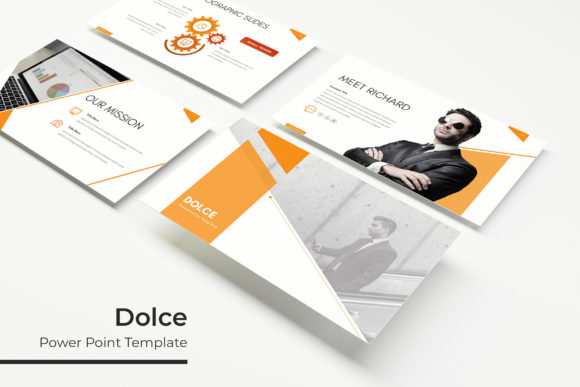
Creating a presentation that holds attention and communicates ideas clearly is no small task. For many professionals, the process involves balancing aesthetics with functionality, often under tight deadlines. This is where a well-designed template becomes a strategic asset. The Dolce Keynote Template has emerged as a robust solution for those who need more than just a basic slide deck—it offers a complete ecosystem for crafting polished, high-impact presentations. With a substantial library of 150 slides spread across five distinct color variations, Dolce provides the flexibility and depth that modern presenters require, whether they are pitching to clients, reporting to stakeholders, or delivering a keynote at a conference.
Why Slide Volume and Color Variety Matter
One of the first aspects users notice about the Dolce Keynote Template is its sheer volume of content. With 150 total slides, the template eliminates the need to start from scratch or adapt a limited set of layouts. Each of the five premade color themes includes 30 slides, meaning a user can select a palette that aligns with their brand or presentation mood without sacrificing slide diversity. This structure is especially valuable for multi-day workshops, comprehensive business proposals, or academic portfolios where consistency across sections is crucial.
The color variations also cater to different industries and settings. A darker, more dramatic palette might suit a creative agency's portfolio review, while a lighter, professional scheme works well for corporate quarterly reports. Having these options pre-built allows the presenter to focus on content rather than spending hours tweaking hues and contrast levels. The Dolce Keynote Template essentially provides a foundational visual language that can be applied instantly, reducing the friction between idea and execution.
Handcrafted Infographics and Visual Storytelling
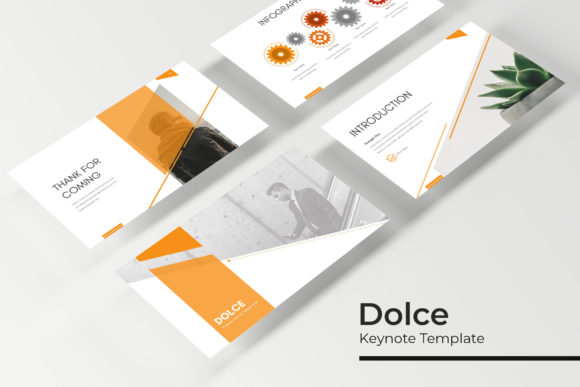
Data visualization remains one of the most challenging aspects of presentation design. Converting raw numbers into compelling visuals often requires specialized graphic design skills. The Dolce Keynote Template addresses this through its handcrafted infographic elements. These are not generic, automated charts but thoughtfully constructed graphics that guide the viewer's eye and simplify complex information. The infographics are built into the slide layouts, so users can edit data points, labels, and colors without breaking the design integrity.
For example, marketing professionals presenting campaign performance metrics can leverage Dolce's infographic slides to show conversion funnels, demographic breakdowns, and growth trends. Rather than inserting a static chart from a spreadsheet, they can use the template's resizable and editable graphics to create a narrative that flows naturally from one data point to the next. This integration of design and data is what separates a memorable presentation from a forgettable one. The handcrafted nature of these elements also ensures that they remain pixel-perfect across different display resolutions, from laptop screens to large projectors.
Section Breaks and Portfolio Slides
Another structural strength of the Dolce Keynote Template lies in its section break slides and dedicated portfolio and gallery pages. In longer presentations, section breaks serve as visual breathers that signal a shift in topic or focus. Dolce provides multiple section break designs that maintain thematic continuity while offering enough distinction to separate chapters of a presentation. This is particularly useful in educational settings or during multi-phase project updates where clarity of structure directly impacts audience comprehension.
The gallery and portfolio slides are equally well-considered. For creatives—photographers, designers, architects—showcasing work is a daily necessity. Dolce's portfolio layouts include image placeholders that support drag-and-drop functionality. Users can quickly insert their visuals without worrying about alignment or cropping issues. The picture placeholders are designed to maintain aspect ratios and adapt seamlessly to the slide's composition. This saves time and preserves the quality of the original imagery. A designer preparing a client pitch portfolio can populate these slides in minutes, confident that the final output will look clean and professional.
Working with Master Slides and Graphics
Efficiency in presentation design often comes down to how well a template leverages Master Slides. Dolce is built on a master slide architecture, which means that any changes made to the master—such as updating a font, adjusting a color, or repositioning a logo—apply uniformly across all slides in that theme. This is a critical feature for teams that need brand consistency. If a company's brand guidelines evolve, updating an entire presentation is a matter of editing the master, not each individual slide.
Additionally, the template’s graphic elements are resizable and editable. Icons, shapes, and illustrations can be scaled up or down without losing sharpness, thanks to their vector-based construction. Users working in Keynote can adjust sizes, rotate elements, or even change colors to match specific branding requirements. This level of control ensures that the final presentation feels custom-made rather than templated. The pixel-perfect illustrations further reinforce this quality, as they remain crisp on retina displays and high-resolution screens. For presenters who value precision, this attention to detail is a significant advantage.
Practical Benefits for Different Workflows
The Dolce Keynote Template is not a one-size-fits-all solution, but its versatility makes it applicable across numerous professional scenarios. Consider a startup founder preparing for a venture capital pitch. The 30 slides within a single color theme provide enough room to cover problem statements, market analysis, product demonstrations, financial projections, and team introductions—all while maintaining a cohesive visual identity. The inclusion of infographic slides helps convey market size and growth potential in a way that is easy for investors to digest quickly.
Similarly, an educator designing a semester-long lecture series can use the multiple color variations to differentiate between modules. One color scheme can be assigned to theoretical foundations, another to case studies, and a third to practical applications. Students benefit from this visual cueing, which aids in information retention and course navigation. The section break slides serve as natural transitions between these thematic blocks, reducing cognitive load during lengthy sessions.
Corporate trainers and human resource professionals also find value in Dolce's structure. Training modules often require a mix of text-heavy slides, interactive graphics, and assessment sections. The template's variety accommodates this mix without requiring design intervention. Resizable graphics allow trainers to enlarge key points or annotate directly on slides during live sessions, making the material more engaging and responsive to audience questions.
What’s Included in the Package
Understanding what comes with the Dolce Keynote Template helps users assess whether it aligns with their needs. The package includes five PPTX files, each corresponding to a different premade color variation. These files are formatted for widescreen displays, which is the standard for modern projectors and monitors. Each file contains 30 slides, adding up to the total of 150 slides across the entire bundle.
Additionally, the package includes a Readme First document that outlines essential usage guidelines. This file also contains links to download the free fonts used in the template. Accessing these fonts ensures that the presentation renders exactly as intended, without fallback issues. It is worth noting that any photographs or pictures shown in the preview are for illustration only and are not included in the download. Users will need to supply their own images, but the template's picture placeholders make this process straightforward.
The reliance on Master Slides and pixel-perfect illustrations means that even users with limited design experience can produce professional results. The drag-and-drop picture placeholders further lower the barrier to entry, allowing quick replacement of sample images with actual content. For small business owners who cannot afford a full-time graphic designer, this template represents a cost-effective way to maintain a high standard of visual communication.
Observations on Font Handling and Image Integration
Font selection is often an overlooked aspect of presentation design, yet it can make or break the overall impression. Dolce addresses this by specifying a free font that can be downloaded via a link included in the Readme First file. This transparency ensures that users are not caught off guard by missing fonts when they open the file on a different computer. It is good practice to download and install the recommended font before starting work on the presentation. This small step prevents formatting issues and maintains the intended typographic hierarchy.
Regarding images, the template’s picture placeholders are designed for efficiency. Users can drag and drop their own photos or graphics directly into the designated areas. The placeholder automatically adjusts to fit the image while preserving the slide's layout. This feature is especially useful when working with a large volume of visuals, such as in a product catalog or event recap. The placeholder ensures that every image is consistently sized and positioned, creating a uniform look without manual alignment.
It’s also worth noting that the template's graphics are pixel-perfect, meaning they retain clarity at any size. This is particularly important for presentations that may be viewed on both small laptop screens and large conference displays. Blurry or pixelated graphics undermine credibility, so having vector-based, scalable elements is a practical safeguard. Users can zoom in on specific diagram details during a presentation without sacrificing quality.
Final Considerations for Choosing Dolce
Before adopting any template, professionals evaluate how it fits into their existing workflow and whether it addresses their specific pain points. The Dolce Keynote Template excels in providing variety without complexity. With five color variations and 30 slides per theme, it offers enough diversity to cover most presentation needs while remaining manageable to navigate. The inclusion of handcrafted infographics, section breaks, and portfolio slides means users don't have to source or create these elements from scratch.
For those who regularly present to different audiences or across multiple projects, having a template that can adapt through color changes and layout flexibility is a significant time saver. The master slide functionality further streamlines updates and ensures brand consistency. While the template does not include stock photography, the thoughtful placeholder system compensates by making image integration fast and foolproof.
Ultimately, the Dolce Keynote Template is designed for presenters who value both aesthetics and efficiency. It acknowledges that a presentation's success depends on clear structure, compelling visuals, and seamless delivery. By providing a robust foundation with room for customization, it allows users to focus on what matters most: communicating their message effectively. Whether you are a seasoned public speaker or someone preparing their first major presentation, Dolce offers the tools to elevate your work without adding unnecessary complexity.