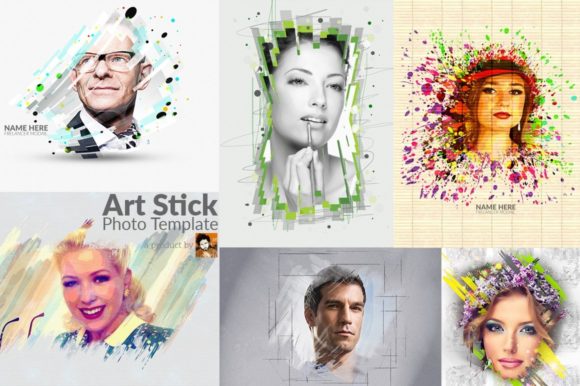
Art Stick Photo Template: A Creative Tool for Digital Artists and Designers
The Art Stick Photo Template has become a go-to resource for digital artists, graphic designers, and photographers looking to enhance their visual storytelling. This versatile tool offers a unique blend of functionality and creativity, allowing users to experiment with different styles and effects while maintaining a high level of customization. Whether you're working on a personal project or a professional design, the Art Stick Photo Template provides an efficient and effective way to bring your vision to life.
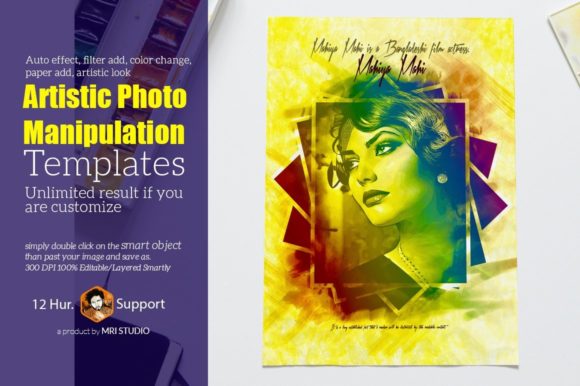
One of the standout features of the Art Stick Photo Template is its smart object placement. This feature enables users to easily insert their own images into pre-designed layouts without compromising the integrity of the overall design. The template's auto effect and filter add functions allow for quick adjustments, making it simple to apply various artistic effects with just a few clicks. This not only saves time but also ensures that your final output maintains a cohesive and professional look.
Customization Options and Flexibility
The Art Stick Photo Template supports a wide range of customization options, making it suitable for a variety of creative needs. Users can change colors, add paper textures, and apply artistic looks to match their specific preferences. This level of flexibility means that the template can be adapted to fit different themes, from minimalist designs to bold and vibrant compositions.
Another key advantage of the Art Stick Photo Template is its unlimited result potential. With the ability to customize and edit layers, users can explore countless variations of their designs. This makes the template ideal for those who want to experiment with different styles or create multiple versions of the same concept. The editable layered structure ensures that each element can be modified independently, providing greater control over the final outcome.
Compatibility and Software Support
The Art Stick Photo Template is compatible with several Adobe Photoshop versions, including CS3, CS4, CS5, CS6, CC, and newer releases. This broad software support ensures that users can access and work with the template regardless of their preferred editing platform. The template is designed as a 6 PSD file, offering a high-resolution format of 3000×2250 pixels with RGB color mode and 300 DPI. These specifications make it suitable for both print and digital use, ensuring clarity and quality in all outputs.
The template also includes a help guide, which is particularly useful for users who may be new to working with layered files or smart objects. This guide provides step-by-step instructions on how to navigate the template, making it accessible to a wide range of skill levels. The smartly organized grouped layers further simplify the editing process, allowing users to locate and modify specific elements quickly and efficiently.
Practical Applications and Use Cases
The Art Stick Photo Template is widely used in various creative fields, including photography, graphic design, and digital art. Photographers often use it to showcase their work in a visually appealing format, while graphic designers utilize it to create mock-ups for client presentations. The template’s versatility makes it suitable for both personal and commercial projects, offering a reliable solution for a range of visual needs.
In addition to its aesthetic appeal, the Art Stick Photo Template is also practical for educational purposes. Teachers and educators can use it to demonstrate design principles, layer management, and photo editing techniques. Its structured layout and clear organization make it an excellent teaching tool, helping students understand how to approach complex design tasks with confidence.
Design Considerations and Best Practices
When using the Art Stick Photo Template, it's important to consider the overall design balance and visual hierarchy. While the template provides a strong foundation, the success of the final output depends on how well the user integrates their own elements. For example, selecting appropriate fonts, such as Lato, can significantly impact the readability and professionalism of the design.
Users should also pay attention to the resolution and color settings when exporting their final work. Ensuring that the image meets the required standards for print or web use can prevent issues related to clarity and color accuracy. Additionally, experimenting with different filters and effects can help users discover new ways to enhance their visuals while maintaining the template’s core structure.
Conclusion
The Art Stick Photo Template stands out as a powerful and flexible tool for creative professionals and enthusiasts alike. Its combination of smart object placement, customizable features, and broad software compatibility makes it a valuable asset in any design workflow. Whether you're looking to refine your skills, streamline your projects, or explore new creative possibilities, this template offers a robust and user-friendly solution that caters to a wide range of needs and preferences.