Hexodus Power Point Template: A Practical Evaluation for Presentation Design
When you need to create a professional presentation quickly, the choice of template can significantly influence both the quality of the final product and the time required to produce it. The Hexodus Power Point Template is one of the more comprehensive options available in the presentation template market, offering a structured system of 150 total slides across five distinct color variations. Understanding what this template actually delivers, where it excels, and where it may fall short is essential for anyone evaluating whether it fits their specific project needs.
What Hexodus Power Point Template Offers
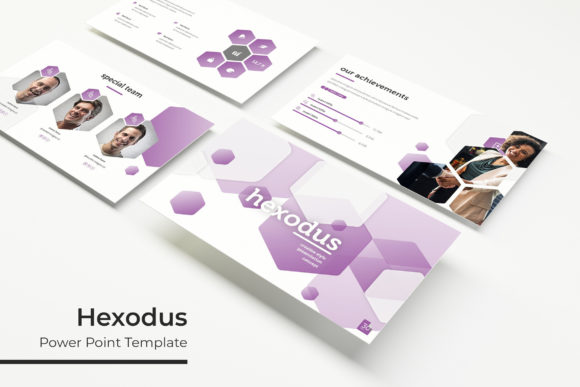
The Hexodus Power Point Template is a presentation design system built for Microsoft PowerPoint. It is organized around five premade color schemes, with each scheme containing 30 slides. This brings the total to 150 slides across the entire package. The template includes five separate PPTX files, each corresponding to one of the five color variations, and all files are formatted for widescreen display. Beyond the slide count, the template features handcrafted infographics, section break slides, dedicated gallery and portfolio slides, and resizable graphic elements. Picture placeholders operate on a drag-and-drop basis, and the entire system is built on master slides for consistent formatting. The package also includes a readme file with a link to download the fonts used, which are free to use.
It is important to note that the photographs or pictures shown in the preview are not included in the purchase. They are used for illustration purposes only, meaning you will need to supply your own images for the picture placeholders. This is standard practice for PowerPoint template packages, but it is a factor worth considering when evaluating the total effort required to complete a presentation.
Why Someone Might Consider This Template
The primary draw for the Hexodus Power Point Template is its sheer volume of slides and color options. For users who need to produce multiple presentations for different clients, departments, or branding guidelines, having five ready-made color variations can save a considerable amount of time. Rather than manually recoloring a single template for each new context, you can open the appropriate PPTX file and begin working immediately. The 150 total slides also mean you are unlikely to run out of layout options for most standard presentation purposes, from data-heavy slide decks to image-focused portfolios.
Another reason for interest is the inclusion of handcrafted infographics. Infographics are notoriously time-consuming to create from scratch, especially for users who do not have a background in graphic design. Having prebuilt, editable infographic elements within the template can accelerate the process of presenting data, timelines, processes, or comparisons. The section break slides and portfolio slides further add variety, making the template suitable for a broader range of presentation types beyond the typical corporate status update.
Benefits
- Consistency through master slides: Because the template is built on master slides, any changes you make to fonts, colors, or spacing are applied globally. This is a significant time-saver and helps maintain a professional, cohesive look throughout the deck.
- Editable graphics and placeholders: All graphic elements are resizable and editable, and picture placeholders are set up for simple drag-and-drop insertion. This lowers the technical barrier for users who are not experienced with PowerPoint's advanced features.
- Pixel-perfect illustrations: The template uses pixel-perfect illustrations, which means they maintain clarity and sharpness on high-resolution displays and when projected. This is especially important for presentations delivered on large screens or modern monitors.
- Free font usage: The included fonts are free to download and use, which avoids licensing complications that sometimes arise with premium typefaces.
Tradeoffs
- Slide count does not equal content quality: Having 150 slides sounds impressive, but the practical value depends on how many of those layouts you actually use. If your presentation only needs 15 slides, you may find that many of the 30 slides per color variation are redundant or overly similar to one another.
- No images included: As noted, the preview photographs are not part of the purchase. You will need to source your own images, which may involve additional cost or time if you do not already have a library of suitable photos.
- Limited to five color variations: While five premade colors are useful, they may not exactly match your organization's brand guidelines. You can modify the colors manually, but doing so will require comfort with PowerPoint's color adjustment tools, and the results may not be as seamless as the original color schemes.
- PowerPoint dependency: The template is built for Microsoft PowerPoint. If you primarily use Google Slides, Keynote, or another presentation platform, you will need to convert the files, which can sometimes result in formatting inconsistencies.
Considerations and Expectations for Users
When evaluating the Hexodus Power Point Template, it helps to be realistic about what a template can and cannot do. A well-designed template provides structure, visual consistency, and a starting point that saves time. However, it does not replace the need for thoughtful content, clear messaging, or audience awareness. You will still need to write, edit, and organize your content. The template handles the visual framework, but the substance remains your responsibility.
Another consideration is the learning curve associated with master slides. While the template is built on master slides for consistency, users who are unfamiliar with PowerPoint's slide master view may find it confusing to customize elements beyond the basic text and image changes. If you are not comfortable working with master slides, you should expect to spend some time learning the basics before you can fully leverage the template's capabilities.
Also, because the template includes five separate PPTX files, file management is something to plan for. You will need to decide which color variation to use before you start building your presentation, and switching to a different color scheme later requires copying content into the appropriate file. This is not a major hurdle, but it is a workflow consideration that may influence your approach if you are working under tight deadlines.
Situations Where Hexodus Is a Strong Fit
The Hexodus Power Point Template is well suited for several common scenarios in professional presentation work. If you are a consultant, freelancer, or in-house marketer who regularly creates presentations for multiple clients or brands, the five premade color variations give you a fast starting point without having to rebuild from scratch each time. The 150-slide range also provides enough layout variety that you can avoid using the same slide design repeatedly across different decks.
Another strong fit is for presentations that rely heavily on data visualization and process explanations. The handcrafted infographics and section break slides allow you to break up dense information and present it in a visually accessible way. Portfolio or gallery slides are also valuable for creative professionals who need to showcase work samples, images, or case studies in a clean, organized format.
The template is also appropriate for users who value consistency and polish but have limited design experience. The master slide system and drag-and-drop placeholders reduce the likelihood of formatting errors, helping you achieve a professional-looking presentation without hiring a designer.
Situations Where Alternatives May Be Worth Considering
For some users, the Hexodus template may not be the best choice. If you frequently present using Google Slides or Keynote, the need to work with PPTX files and potentially convert them could introduce friction. While PowerPoint is the dominant presentation software in many corporate environments, alternative platforms are common, and template compatibility should be verified before purchase.
If your presentation requires a highly unique or brand-specific visual identity, the five premade color schemes may feel restrictive. Although you can edit colors, the overall design language of the template remains the same across all variations. If you need a template that is more minimal, more typographic, or more illustration-heavy, you may find that the Hexodus style does not align with your vision.
Another situation to consider is when your content is relatively simple or short. A 150-slide template system is designed for depth and variety, but if you only need a 10-slide pitch deck or a straightforward internal update, the breadth of options may be unnecessary. In such cases, a smaller, more focused template might be easier to navigate and faster to customize.
Finally, if you rely on high-quality stock photography as a core part of your presentations, you will need to factor in the cost and time of sourcing images, since none are included. Templates that bundle stock photos may offer a more complete all-in-one solution, even if they have fewer slide layouts overall.
Practical Decision-Making Insights
To determine whether the Hexodus Power Point Template aligns with your goals, start by clarifying the type of presentations you create most often. If you produce multiple decks per month with similar structure but different color requirements, the five-variation system is a practical investment. If your work is more varied in content and style, you might benefit from a template library that offers different design directions rather than multiple color versions of the same design.
Also, consider your level of comfort with PowerPoint's customization features. The template is designed to be user-friendly, but the depth of editing possible depends on your skills. If you are comfortable with master slides and object formatting, you can adapt this template extensively. If you prefer to simply plug in text and images with minimal adjustments, the template's prebuilt layouts will serve you well, but you will be limited to the existing structure.
Another practical step is to examine the slide layouts carefully before purchasing. Look at the preview images and check whether the template includes the specific slide types you frequently need, such as timelines, comparison slides, quote slides, or data charts. The presence of handcrafted infographics is a plus, but confirm that they match the kind of data you typically present. Relying on general descriptions like "infographics" can be misleading if the actual designs do not suit your use case.
Finally, remember that templates are tools for efficiency, not substitutes for strategy. Even the most comprehensive template will not compensate for unclear messaging, poor audience targeting, or weak visual hierarchy in your content. Use the Hexodus template as a foundation, but invest time in structuring your narrative and refining your key messages before you begin designing slides.
Determining Alignment With Your Needs
The Hexodus Power Point Template offers a substantial collection of slides, five ready-to-use color variations, and design elements that can accelerate the creation of professional presentations. For users who regularly produce multi-slide decks, value visual consistency, and work within PowerPoint, it provides a practical and reasonably comprehensive solution. The inclusion of handcrafted infographics and portfolio slides expands its usefulness beyond basic corporate templates.
At the same time, the template requires you to supply your own images, and its design is fixed around five color schemes. Users who need more flexibility in visual style, work outside PowerPoint, or produce very short presentations may find that a different template or a custom approach better meets their needs. The decision ultimately depends on the frequency, complexity, and context of your presentation work, as well as your willingness to invest time in customization.
By evaluating the template against your specific use cases, technical environment, and content requirements, you can make an informed choice that saves time without compromising on quality. The Hexodus Power Point Template is a capable option in the presentation template landscape, but like any tool, its value is determined by how well it fits the task at hand.