Prixi Power Point Template: A Versatile Presentation Toolkit
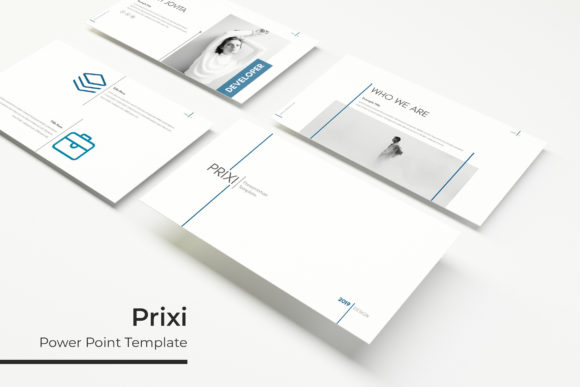
Presentations are a core part of professional communication. Whether you are pitching a project, onboarding a client, or sharing quarterly results, the quality of your slides says a lot about your preparation and attention to detail. The Prixi Power Point Template is built to simplify that process, offering a flexible structure that helps you produce clean, engaging presentations without needing to start from a blank file every time. With 150 total slides spread across five color variations, this toolkit gives you room to adapt, reuse, and refine your content for different audiences and contexts.
The template is designed for people who value efficiency but do not want to sacrifice visual quality. Instead of spending hours aligning boxes and picking color palettes, you can focus on your message. The five premade colors—each set containing 30 slides—allow you to match corporate branding, personal style, or a specific campaign theme. This variation means one purchase can serve multiple projects over time.
Structure That Supports Storytelling
A good presentation is more than a collection of facts. It guides the audience through a narrative. The Prixi Power Point Template includes section break slides and portfolio layouts that help you structure your story naturally. Section break slides act as visual pauses, signaling a shift in topic or phase. This is especially useful for longer presentations where viewers need a moment to reset before the next segment. Portfolio slides, on the other hand, let you showcase work, case studies, or product highlights in a clean, organized way.
For educators and trainers, this structure is valuable for creating module-based content. Each section can represent a lesson chapter, with the break slide serving as a clear transition. Freelancers and small business owners can use the portfolio slides to present previous work or client testimonials without cluttering the main narrative.
Handcrafted Infographics for Data Communication
Numbers and processes can be hard to explain with words alone. The handcrafted infographic slides in this template give you a head start. These visuals are not generic shapes—they are built to convey specific relationships, timelines, and comparisons. When you need to show survey results, budget breakdowns, or workflow steps, these infographics save you the trouble of building charts from scratch. They also maintain a consistent look across your presentation, which reinforces professionalism.
Because the infographics are editable, you can modify colors, resize elements, and adjust text to fit your actual data. This flexibility is helpful for marketers preparing campaign performance reports or project managers explaining resource allocation. The key is that the core visual logic is already there, reducing the risk of miscommunication.
Efficiency Through Master Slides and Placeholders
One practical benefit of the Prixi Power Point Template is its reliance on master slides. Master slides allow you to update a single layout and have those changes cascade across every slide that uses it. If your client’s logo changes mid-project or you need to adjust the footer, you can fix it once instead of searching through 100 slides. This saves significant time, especially when working under tight deadlines.
The picture placeholders work in a similar way. Rather than cropping and resizing images manually, you can drag and drop photos into designated areas. The placeholder adjusts automatically, keeping your layout intact. This is particularly useful for bloggers or publishers who frequently update presentations with new visuals. It also reduces the chance of distortion or alignment issues that can make a slide look amateurish.
Resizable and Editable Graphics for Customization
Not every presentation needs the same look. When you want to tweak an icon or adjust a chart, the resizable and editable graphics in this template make it straightforward. You can scale elements without losing quality because the illustrations are pixel-perfect. This matters when you are projecting on a large screen or sharing slides in high-resolution PDF format.
For small business owners who handle their own presentations, this means you can adapt the template to reflect seasonal promotions or new branding without starting over. If you change your brand color next quarter, the five premade color variations serve as a starting point for further adjustments. Consistency across materials builds trust with your audience, and having editable graphics makes that consistency easier to maintain.
What You Get Inside the Package
The Prixi Power Point Template includes five PPTX files, each with its own premade color theme. All files are in widescreen format, which matches modern monitors and projectors. A Readme file explains which fonts are used and provides a download link for the free fonts. This ensures your presentation looks the same on different devices. It is important to note that the photographs shown in the preview are for illustration only and are not included. However, the drag-and-drop placeholders make it simple to add your own images.
Having five distinct color variations means you can pick the one that best fits your current project. For a tech startup pitch, you might choose a sleek, modern palette. For a nonprofit annual report, a warmer, more approachable set might work better. With 30 slides per color variation, you have enough layouts for most standard presentations without running out of options. If you need more, you can mix and match across the themes.
Who Benefits Most from This Template
Professionals who prepare presentations regularly will appreciate the time savings and consistency. Marketers can use the gallery and portfolio slides to present campaign visuals or client wins. Educators can structure lecture content around the section breaks and infographics. Freelancers and hobbyists who occasionally need to create polished decks will find the template approachable even if they do not have advanced design skills.
That said, the template may not be ideal for every scenario. If your presentation requires heavily custom animations or non-standard aspect ratios, you might need additional edits. Also, because the photographs are not included, you will need to source your own images or use free stock photos. This is a minor step, but it is worth considering if you prefer an all-in-one solution. Comparing the Prixi Power Point Template with other options based on your specific needs—such as the number of slides, color flexibility, and ease of editing—can help you decide if it fits your workflow.
Practical Recommendations for Using the Template
To get the most out of this toolkit, start by planning your slide structure. Use the section break slides to outline main topics before filling in content. The portfolio slides are best placed after introductory material, giving you a natural way to present credentials or case studies. When you need to display data, choose the handcrafted infographics that match your numbers, then adjust the colors to align with the premade theme you selected.
If you work with a team, the master slide approach helps ensure everyone uses the same formatting. Share the readme file so colleagues know which fonts to install. This reduces formatting discrepancies when multiple people edit the same deck. For solo users, the drag-and-drop picture placeholders speed up the process of replacing placeholder images with your own, whether they are product shots, team photos, or screenshots.
The Prixi Power Point Template is a practical resource for anyone who wants to produce consistent, visually clear presentations without excessive effort. It is not a magic solution—you still need to think about your content and audience. But having a flexible structure with premade colors, editable graphics, and efficient placeholders removes much of the friction that slows down presentation creation. For busy professionals and creators who value both quality and speed, this toolkit can become a reliable part of your workflow.