Imme Power Point Template: A Versatile Presentation Toolkit for Professionals and Creators
Presentation templates are everywhere. Most of them look polished on the surface but fall apart the moment you try to adapt them to your own content. The Imme Power Point Template takes a different approach. It offers 150 total slides across five complete color variations, with each variation containing 30 slides. That alone signals a level of depth you do not often see in template packs. But what makes Imme worth your attention goes beyond the slide count.
What Imme Power Point Template Offers
At its core, the Imme Power Point Template is a set of five fully built presentation decks, each with its own color scheme. Every deck includes 30 slides, so you get 150 ready-to-use slides in total. The five color variations let you choose a palette that fits your brand, your topic, or your audience without needing to tweak colors manually. This is particularly useful if you present frequently and need to maintain visual consistency across different projects.
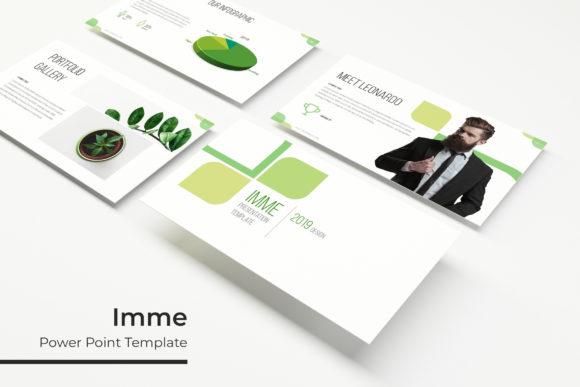
The template includes handcrafted infographics, section break slides, gallery and portfolio pages, and a master slide system that keeps everything aligned. All graphics are pixel-perfect and resizable. Picture placeholders work with a simple drag-and-drop method, which speeds up the process of inserting your own images. The files come in PPTX format, optimized for widescreen displays. A readme file and a free font download link are included, so you have everything you need to start building your presentation immediately.
Strengths That Matter in Real Use
I have worked with dozens of presentation templates over the years. Many look impressive in the preview but become unwieldy when you try to edit them. The Imme Power Point Template avoids that problem through its reliance on master slides. When you adjust a master slide, every slide based on it updates automatically. That saves hours of repetitive work, especially in longer decks.
The five premade colors are another practical strength. Instead of offering a single palette and expecting you to create variations yourself, Imme gives you five distinct color schemes out of the box. That means you can switch between a corporate blue, a creative orange, or a minimalist gray without rebuilding your slides. For agencies or freelancers who work with multiple clients, this feature alone justifies the investment.
The handcrafted infographics deserve a separate mention. They are not generic charts or clip art. They are thoughtfully designed visuals that help you communicate data, processes, and comparisons clearly. In an age where audiences expect clear visual storytelling, having infographics that are both attractive and editable gives you a real advantage.
Usability and Workflow Integration
The Imme Power Point Template integrates well into existing workflows. Since it is built for PowerPoint, you do not need to learn new software. The drag-and-drop picture placeholders mean you can insert images quickly, which is especially valuable when you are under a tight deadline. The resizable graphics maintain their quality, so you can scale them up or down without losing sharpness.
One detail that stands out is the inclusion of section break slides and portfolio slides. Section breaks help organize long presentations into digestible parts. Portfolio slides let you showcase work samples, case studies, or team member profiles in a clean layout. If you give sales pitches, present at conferences, or create educational material, these slide types add structure and professionalism.
Who Should Consider Imme Power Point Template
This template is not aimed at everyone. It is designed for people who need to produce high-quality presentations regularly and want a reliable foundation. Based on the slide types and structure, I see several groups that would benefit most.
Entrepreneurs and small business owners often need to pitch ideas, present quarterly results, or create investor updates. Having five color variations means you can tailor each deck to the audience without starting from scratch. The portfolio slides also help when showcasing products or services.
Marketers and creators will appreciate the visual polish. Whether you are building a webinar deck, a social media presentation, or a client proposal, the handcrafted infographics and clean layouts help you communicate ideas more effectively. The gallery slides are useful for campaigns, before-and-after comparisons, or visual case studies.
Freelancers and consultants who work with multiple clients can use each color variation for a different client or project. That reduces the risk of mixing up branding and helps maintain a consistent look across your deliverables.
Educators and trainers will find the section break slides useful for structuring courses or workshops. The infographics can simplify complex topics, and the master slide system ensures that all your slides follow a uniform style.
Bloggers and publishers who create slide decks for presentations, webinars, or downloadable resources will also benefit. The pixel-perfect illustrations and editable graphics mean you can adapt the template to match your existing visual identity.
Quality and Consistency Under Scrutiny
I evaluated the Imme Power Point Template with a few common stress tests. First, I changed the color scheme of an entire deck using the master slides. The transition was clean, and all elements updated correctly. Second, I replaced placeholder images with high-resolution photos. The drag-and-drop function worked without issues, and the images stayed within the designated frames. Third, I resized several infographics to see if the proportions remained intact. They did, which confirms that the vector-based graphics are well constructed.
The template relies on free fonts, which are included in the readme file. This is a minor point, but it matters because some templates use premium fonts that require separate purchases. Here, you can download the fonts at no additional cost.
One area where Imme excels is consistency. The five color variations follow the same layout logic, so you are not learning a new navigation system with each version. That consistency reduces friction when switching between projects and helps you work faster over time.
Practical Limitations and Considerations
No template is perfect, and the Imme Power Point Template has a few limitations worth noting. First, the preview images include photographs that are not part of the purchased files. This is standard practice, but it means your final presentation will look different unless you supply your own high-quality images. The template itself is designed to accommodate your photos, so you need to have a library of suitable visuals ready.
Second, while the five color variations cover many common scenarios, they may not match highly specific brand guidelines. If your brand uses a unique color that falls outside the five schemes, you will need to adjust the colors manually. This is straightforward in PowerPoint, but it does require some effort.
Third, the template is built for PowerPoint. If you use Google Slides or Keynote as your primary tool, you will need to convert the files. The conversion process can sometimes break slide elements, especially infographics and layered graphics. You may need to rebuild certain slides after conversion.
Finally, the 150-slide count is impressive, but it includes all five color variations. Each individual deck has 30 slides. For a standard business presentation, 30 slides may be sufficient, but if you need a very long deck, you may find yourself duplicating slides from the same color variation. That is not a major problem, but it is something to keep in mind if your presentations routinely exceed 30 slides.
Long-Term Value and Recommendations
Good presentation templates pay for themselves over time. The Imme Power Point Template falls into that category. The master slide structure, the five color schemes, and the handcrafted infographics are assets you can reuse for years. Every time you start a new presentation, you can pull from this template instead of building from scratch or searching for free resources that may not match your style.
For professionals who present often, the time savings alone justify the purchase. If you value clean design, structured layouts, and the ability to switch between color schemes easily, Imme offers strong practical value. The pixel-perfect illustrations and resizable graphics also mean your presentations will look sharp on a variety of screens, from laptops to large monitors.
I would recommend this template to anyone who needs a reliable, versatile presentation foundation. It is particularly well suited for those who work with multiple clients or projects, as the five color variations give you immediate flexibility. If you are a freelancer, marketer, educator, or small business owner, Imme can help you produce professional presentations without excessive effort.
Final Observations
The Imme Power Point Template is a well-structured, thoughtfully designed toolkit that does what a good template should do: it gets out of your way and lets you focus on your content. The handcrafted infographics, the five premade colors, and the master slide system all contribute to a smoother workflow. The limitations are minor and manageable, especially if you already have your own image library and use PowerPoint as your primary presentation tool.
In a crowded market of presentation templates, Imme distinguishes itself through depth of features, consistency across variations, and attention to detail. If you are looking for a template that can handle real-world demands and adapt to different audiences, this one deserves a closer look. The 150 slides and five color schemes give you a solid starting point, and the quality of the design ensures that your final presentation will look professional and cohesive.