Opinium PowerPoint Template: A Complete Design Toolkit
If you have ever spent hours wrestling with slide layouts, trying to make a presentation look polished without design skills, you know the struggle. The Opinium PowerPoint Template aims to solve that exact problem. It offers 150 total slides across five premade color variations, with 30 slides per template. That means you get five distinct presentation decks in one purchase, each with its own color scheme but sharing the same thoughtful structure. For professionals, creators, entrepreneurs, and educators who regularly build decks for clients, teams, or classrooms, this kind of versatility can be a genuine time-saver.
What Makes Opinium Stand Out
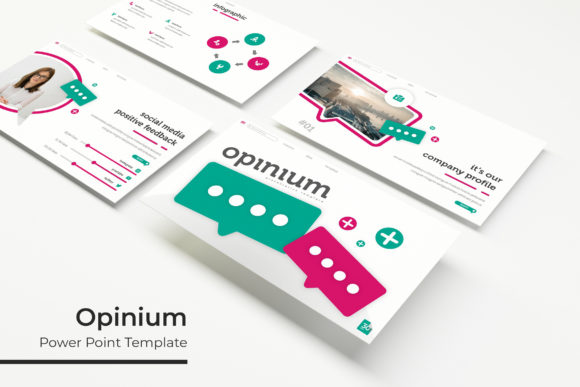
The core strength of this template lies in its volume and variety. Five color variations mean you can match a presentation to a brand palette, a client's corporate identity, or simply a mood. Each template includes handcrafted infographics, section break slides, gallery and portfolio slides, and resizable, editable graphics with picture placeholders. The drag-and-drop functionality works smoothly with PowerPoint's native tools, so you are not fighting the software.
Because the template is built on master slides, any global changes you make—like swapping a font or adjusting a color accent—apply across all slides instantly. This is a huge advantage when you need to maintain consistency across a long deck. The pixel-perfect illustrations are another highlight. They look crisp on screens and projectors alike, and they are vector-based, so scaling them does not degrade quality.
What You Actually Get
The package includes five PPTX files, each in widescreen format, plus a Readme file with a link to download the free fonts used. The preview images in the product listing are for illustration only—real photographs are not included. That is standard for templates like this, but it is worth noting so you plan your own image sourcing. The font link is a nice touch because it removes the guesswork of matching the look exactly.
Practical Applications Across Different Roles
This template is not a one-trick pony. Its structure supports a wide range of real-world uses.
For Business Pitches and Client Proposals
When you are presenting to a potential client, first impressions matter. Using Opinium, you can build a pitch deck that opens with a strong portfolio slide, moves through problem-solution infographics, and closes with a clean contact section. The five color options let you choose a tone that fits the industry—conservative blue for finance, warm orange for creative agencies, or clean gray for tech startups. The section break slides give your narrative breathing room, signaling transitions between topics like market analysis, strategy, and pricing.
For Internal Team Reports and Quarterly Reviews
Internal presentations often suffer from visual monotony. With 30 slides per template, you have enough variety to keep a 20-minute review engaging without repeating layouts. Use the infographics to turn quarterly data into digestible charts. The gallery slide works well for showcasing team achievements, project milestones, or product photos. Because the template is resizable and editable, you can tweak the graphics to match your company’s exact metrics.
For Educators and Trainers
Teachers and corporate trainers can benefit from the clear, structured layouts. Section break slides are excellent for dividing a workshop into modules. The portfolio slide can be adapted to show student work or training case studies. Since the template uses master slides, you can add your own branding or institutional logo once, and it will appear on every slide automatically. This saves hours of repetitive formatting.
For Freelancers and Solopreneurs
If you are a freelancer juggling multiple clients, efficiency matters. Having five premade color palettes means you can quickly assign a color scheme to each client without rebuilding your deck from scratch. The drag-and-drop picture placeholders let you swap images in seconds. For portfolio presentations, the gallery and portfolio slides give your work a professional gallery feel, which can help you land higher-paying projects.
Efficiency and Workflow Benefits
Time is the most obvious benefit. Instead of starting from a blank slide, you have a full deck framework ready to populate. The handcrafted infographics are particularly valuable because creating custom infographics in PowerPoint from scratch is tedious and often results in messy alignments. With Opinium, you get professional-looking diagrams that are fully editable, so you can update text, colors, and shapes without breaking the design.
The resizable graphics mean you are not locked into a fixed aspect ratio. If you need to shrink a diagram to fit a two-column layout or enlarge an icon for emphasis, you can do it without distortion. That flexibility is rare in many templated decks, which often break when you try to scale elements.
Branding Consistency Made Simple
For marketers and business owners who present regularly, brand consistency is non-negotiable. The master slide structure allows you to set your fonts, colors, and logo once. Every new slide you create will inherit those settings. The five color variations also mean you can test different palettes against your brand guidelines before committing to one. Once you find the right match, you can lock it in and reuse that template file for future decks.
Realistic Considerations Before You Buy
No template is perfect for every scenario, and Opinium has some trade-offs worth knowing.
Learning Curve with Master Slides
While master slides are powerful, they can confuse users who are not familiar with PowerPoint's Slide Master view. If you accidentally edit a layout directly instead of using the master, you might create inconsistencies. Take ten minutes to read the Readme file and experiment with the master view before building your first deck. Once you understand how edits propagate, the template becomes much easier to manage.
Image Sourcing Is on You
The preview images are not included, so you need your own photographs or stock photos. This is not a drawback per se—it means you use your own brand imagery—but it adds a step to your workflow. Plan to allocate time for sourcing or shooting images that match the template's clean, modern aesthetic.
Five Files, Not One Giant Deck
The five PPTX files are separate templates, not a single file with five color variants. This is actually an advantage because it keeps each file lightweight and focused. However, if you want to combine slides from different color templates into one deck, you will need to manually adjust the colors afterward. Most users will simply pick one palette and run with it.
How to Get the Most Out of This Template
Start by opening each of the five files to see which color variation fits your current project. Copy the free fonts as soon as you download the Readme file—install them before you start editing so your text renders correctly. Then, spend 15 minutes in Slide Master view to add your logo and set your brand colors. After that, work through the slides in order, replacing placeholder text and images with your own content. The section break slides are perfect for dividing your presentation into natural chapters, so use them intentionally rather than cluttering every topic with a break.
For portfolio or gallery slides, choose your strongest visuals first. The layout is designed to highlight images, so let them breathe with minimal text overlays. For infographics, adjust the data points to reflect your real numbers, not the placeholder values. Audiences notice when charts feel generic.
Who This Template Is Best Suited For
Based on its structure and features, Opinium works well for anyone who regularly builds presentations and values both speed and polish. Marketers will appreciate the brand-ready layouts. Entrepreneurs will like having multiple color options for different pitches. Educators will benefit from the clear modular structure. Freelancers and hobbyists will find the drag-and-drop simplicity freeing. Even if you are a seasoned presenter with strong design skills, having a solid template foundation saves you from reinventing the wheel for every new talk.
If your presentations are rare or you only ever need a single color scheme, the five-variant approach may offer more than you need. In that case, you might prefer a smaller template. But if you present frequently, to different audiences, with varying branding requirements, the five-color library becomes a practical asset rather than excess.
Final Observations
The Opinium PowerPoint Template delivers on its promise of volume and flexibility. The 150 total slides give you enough material to build multiple decks without repeating layouts. The five premade color variations offer genuine utility for branding and audience adaptation. The handcrafted infographics, section breaks, and portfolio slides are well-designed and genuinely useful. The inclusion of free font links and clear Readme instructions lowers the barrier to entry.
As with any template, the final result depends on your content and how you customize the structure. But this template removes many of the common friction points—layout inconsistency, boring infographics, hard-to-edit graphics—that make PowerPoint work feel like a chore. For professionals who need to communicate clearly and look good doing it, Opinium is a solid investment in your presentation workflow.